While Clockify is popular for simple manual time logging, modern remote teams and agencies require deeper supervisory verification. Clockify does not offer real-time live screen streaming, and its static screenshot capture is locked behind high-tier plans. If your organization requires on-demand live desktop viewing, automated screenshot archives, and anti-bypass AI, modern employee monitoring alternatives to clockify like Tracknesty, Time Doctor, and Insightful provide superior oversight and value.
1. Why Teams Search for Clockify Alternatives in 2026
Clockify earned widespread recognition as an entry-level time tracker due to its free tier and clean interface. However, as distributed work models mature across software development, digital marketing, and business process outsourcing (BPO), remote managers face critical operational limitations:
- No Real-Time Live Screen Streaming: Clockify has no capability to stream active desktop screens. Supervisors cannot view ongoing work live or verify complex multi-monitor tasks without interrupting employees.
- Expensive Tier Gating for Basic Proof of Work: Essential supervisory features like automated screenshot capture are locked away in Pro ($7.99/user/mo billed annually or $9.99/user/mo monthly) and Enterprise ($11.99/user/mo) plans.
- Vulnerability to Time Theft & Mouse Jigglers: Clockify tracks generic keyboard and mouse activity percentages. It cannot detect physical USB mouse jigglers or software auto-clickers, making raw timesheet hours vulnerable to inflation.
- Disconnected Compensation & Payroll: While Clockify calculates billable totals, finalizing compensation requires manual spreadsheet exports or third-party payroll integrations.
Teams managing remote contractors, customer support queues, or client projects need more than self-reported stopwatch timers. They require clockify alternatives with screenshots and continuous visual proof of work.
2. Static Screenshots vs. Live Screen Monitoring: Understanding the Difference
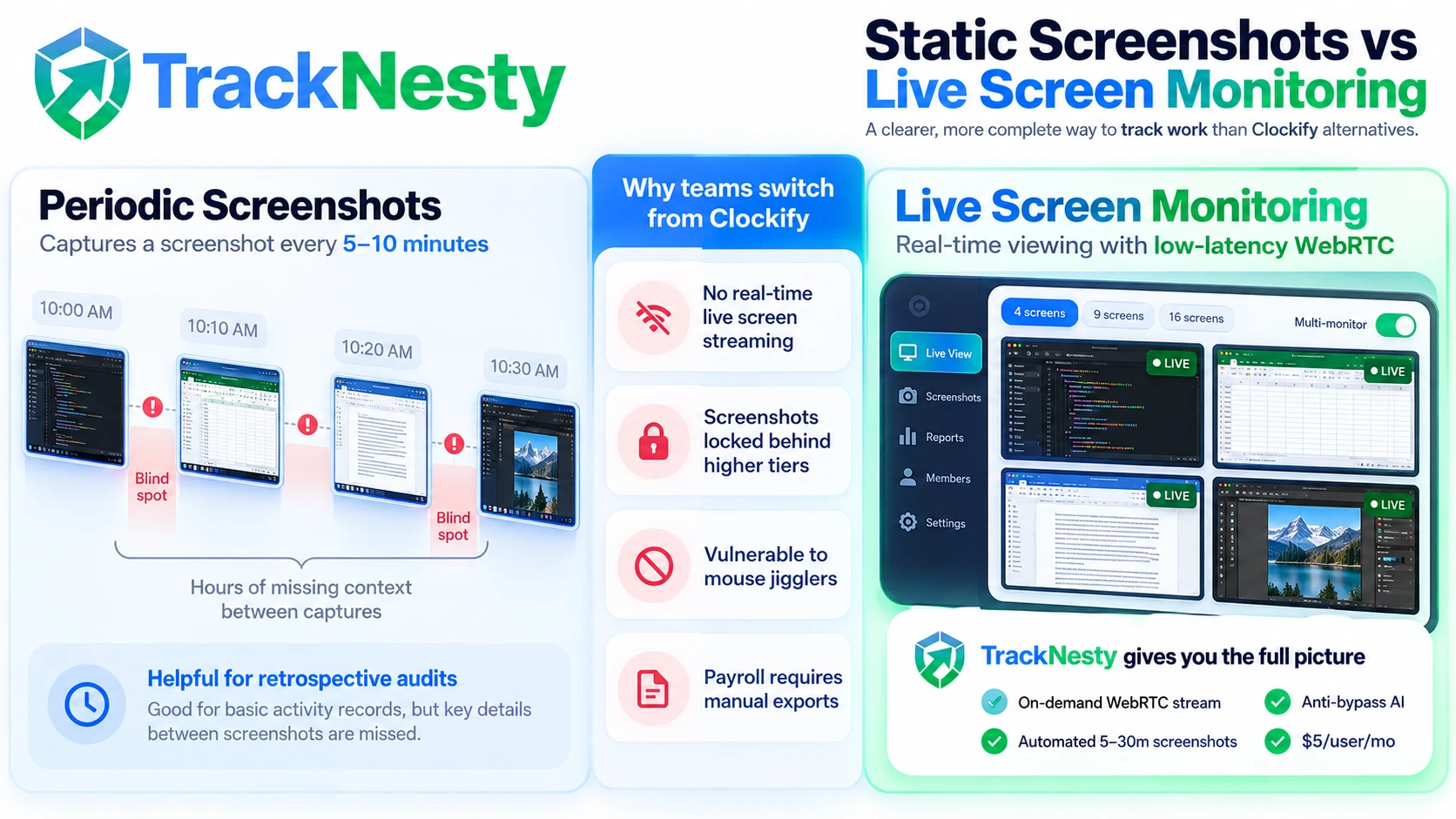
When evaluating clockify alternatives for remote teams, it is vital to distinguish between traditional static screenshot capture and modern low-latency live screen streaming:
Periodic Screenshots
Captures a static snapshot every 5 to 10 minutes. While helpful for retrospective audits, it leaves significant blind spots between intervals and accumulates massive image storage libraries in the cloud.
Live Screen Monitoring
Leverages secure, low-latency WebRTC streaming to broadcast active agent displays on-demand. Managers can verify live progress in real-time, toggle multi-monitor feeds, and prevent time theft without consuming excess cloud storage.
For a full technical breakdown on network bandwidth, privacy preservation, and latency, explore our in-depth guide on live screen monitoring vs screenshot monitoring.
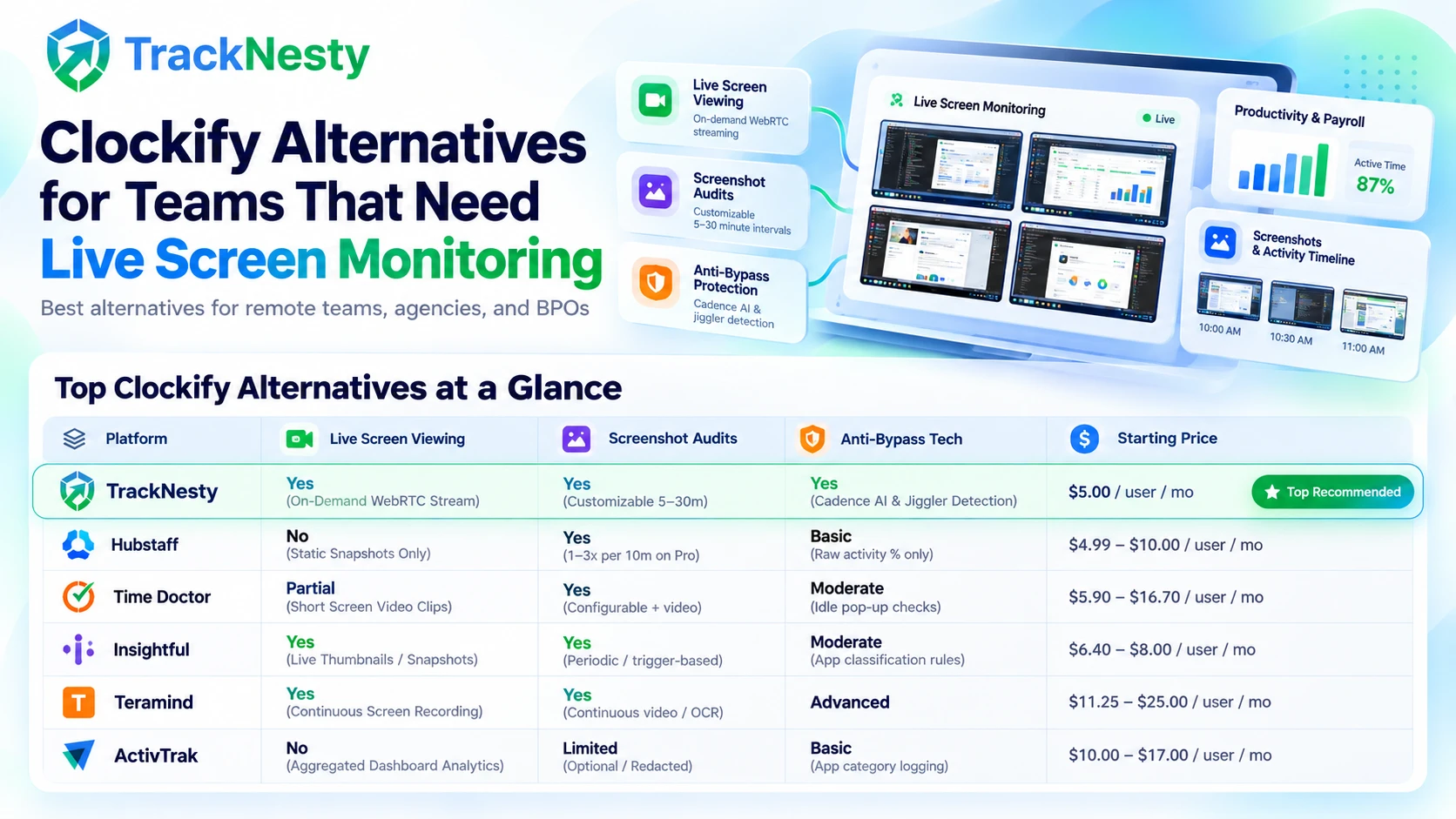
3. Comparison Matrix: Top Clockify Alternatives at a Glance
Here is how the top employee monitoring alternatives to clockify compare across live monitoring, screenshot frequency, anti-bypass AI, and entry pricing:
| Platform | Live Screen Viewing | Screenshot Audits | Anti-Bypass Tech | Starting Price |
|---|---|---|---|---|
| TracknestyTop Recommended | Yes (On-Demand WebRTC Stream) | Yes (Customizable 5-30m) | Yes (Cadence AI & Jiggler Detection) | $5.00 / user / mo |
| Hubstaff | No (Static Snapshots Only) | Yes (1–3x per 10m on Pro plan) | Basic (Raw activity % only) | $4.99 – $10.00 / user / mo |
| Time Doctor | Partial (Short Screen Video Clips) | Yes (Configurable + video) | Moderate (Idle pop-up checks) | $5.90 – $16.70 / user / mo |
| Insightful | Yes (Live Thumbnails / Snapshots) | Yes (Periodic / trigger-based) | Moderate (App classification rules) | $6.40 – $8.00 / user / mo |
| Teramind | Yes (Continuous Screen Recording) | Yes (Continuous video / OCR) | Advanced (Keystroke & OCR logging) | $11.25 – $25.00 / user / mo |
| ActivTrak | No (Aggregated Dashboard Analytics) | Limited (Optional / Redacted) | Basic (App category logging) | $10.00 – $17.00 / user / mo |
4. In-Depth Evaluation of the Top Clockify Alternatives
Tracknesty
Tracknesty is an all-in-one workforce intelligence and remote productivity platform engineered specifically for distributed agencies, software developers, and BPO operations. Unlike Clockify, which restricts screenshots to expensive plans and completely lacks live video viewing, Tracknesty includes zero-latency live screen monitoring on every account.
Key Advantages
- Real-time WebRTC desktop screen streaming with multi-monitor support.
- Automated periodic screenshot captures with idle-time filtering.
- Patented Anti-Bypass technology detects USB mouse jigglers and auto-clickers.
- Built-in automated payroll calculation and PDF payslips.
- Flat, transparent pricing ($5.00/user/mo) with no feature paywalls.
Limitations
- Focused on desktop workforce oversight (Windows client agent).
- Does not provide invoicing or client retainer billing tools.
Hubstaff
Hubstaff is one of the most established names in employee time tracking. It provides automated screenshot capture (1 to 3 snapshots per 10-minute block), GPS location tracking, and basic project budgeting.
Key Advantages
- Strong mobile GPS tracking and geofenced job sites.
- Integrates with over 30 project management tools (Asana, Jira, Trello).
- Automated payroll add-on for PayPal and Wise disbursements.
Limitations
- No live screen monitoring: Cannot stream active desktop feeds in real time.
- Base plan lacks screenshot capture (requires Grow or Team tiers).
- Activity percentages are easily fooled by mechanical mouse jigglers.
Time Doctor
Time Doctor is designed for medium-sized enterprises seeking productivity metrics and application usage tracking. It offers periodic screenshot capture, short screen video recordings, and poor-time-use warning popups.
Key Advantages
- Detailed productivity categorization (productive vs unproductive apps).
- Short video screen recordings available on higher tiers.
- Automated distraction alerts when employees visit non-work domains.
Limitations
- High pricing: Premium tier with full video features costs $16.70/user/mo.
- Desktop agent is resource-heavy and can cause noticeable latency on older laptops.
- Live viewing is based on cached video snippets rather than instantaneous streaming.
Insightful (formerly Workpuls)
Insightful provides workplace productivity analytics for hybrid and office teams. Its "Live View" feature displays thumbnail snapshots of active employee screens that refresh every few seconds.
Key Advantages
- Clean visual dashboard showing active window snapshots.
- Stealth and visible tracking modes available for managed enterprise devices.
- Automatic time mapping based on application usage.
Limitations
- Live view consists of refreshing image snapshots rather than continuous video streams.
- Can be bandwidth-intensive when loading thumbnail grids for 50+ workers simultaneously.
- No built-in automated payroll calculation engine.
Teramind
Teramind is an enterprise security and Data Loss Prevention (DLP) platform. It provides continuous video screen recording, live remote desktop takeover, keystroke logging, and optical character recognition (OCR) search.
Key Advantages
- Full continuous live screen broadcast and remote desktop takeover.
- Searchable text inside recorded video sessions via OCR technology.
- Comprehensive security compliance and data exfiltration alerts.
Limitations
- Extreme pricing: Minimum 5 endpoints with plans starting at $11.25 to $25.00/user/mo.
- High privacy invasiveness (keystroke logging) can hurt employee morale.
- Complex enterprise installation requiring dedicated IT management.
ActivTrak
ActivTrak focuses on aggregate organizational analytics rather than direct supervisory monitoring. It measures focus time, workload balance, and burnout risk without relying on invasive surveillance.
Key Advantages
- Privacy-first approach with automated sensitive data redaction.
- Workforce burnout indicators and workload capacity dashboards.
- Silent background tracking with minimal employee disruption.
Limitations
- No live screen monitoring: Does not support real-time desktop streaming.
- Screenshot capture is optional and restricted to maintain privacy.
- No native hourly timesheets or payroll calculation capabilities.
5. How to Select the Right Clockify Alternative for Your Team
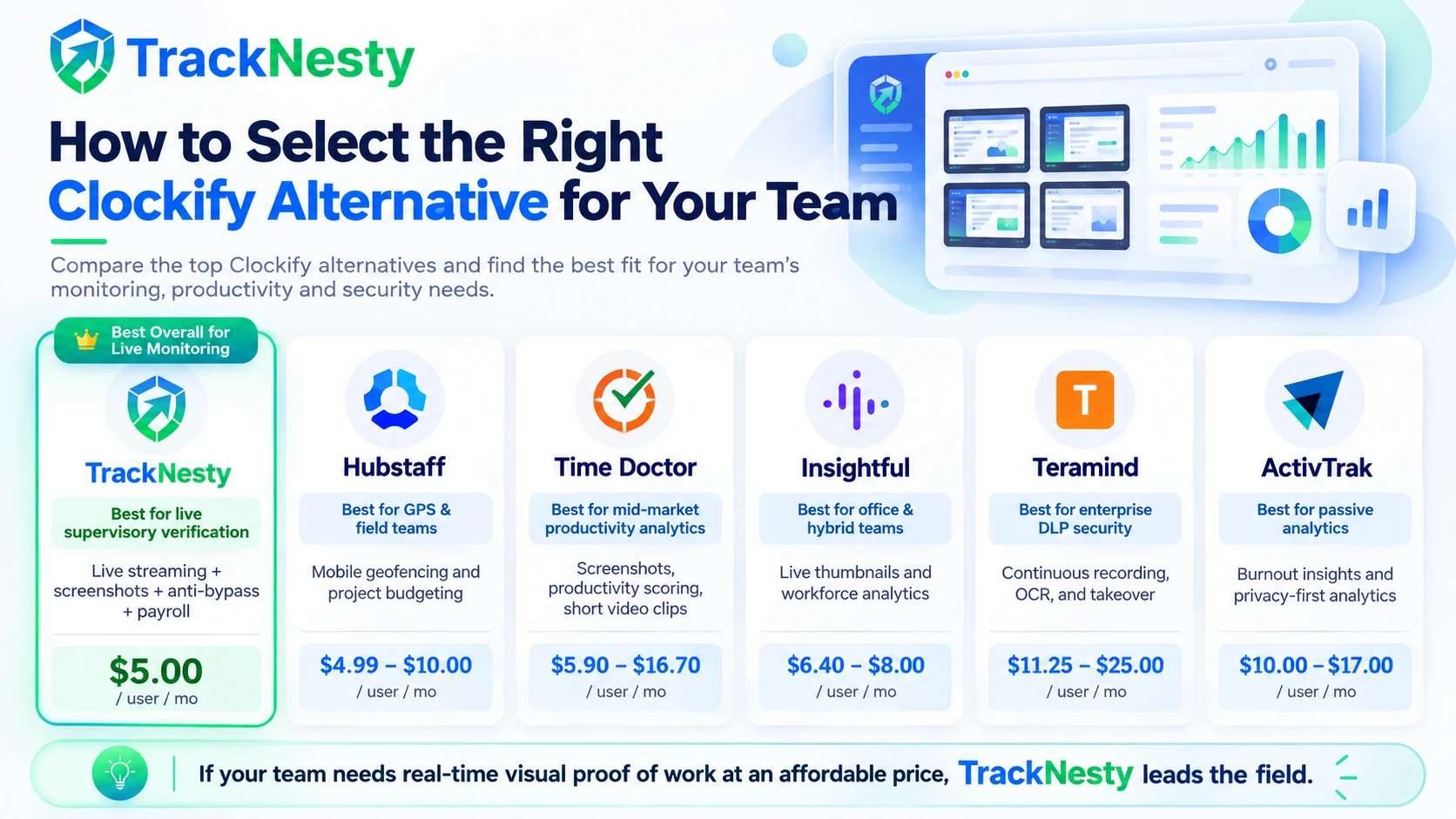
Choosing the right employee monitoring software depends on your operational priorities, team distribution, and supervisory requirements:
- Need Live Supervisory Verification at an Affordable Price? Choose Tracknesty. At $5.00/user/mo, it delivers live desktop screen streaming, anti-bypass jiggler detection, automated screenshots, and built-in payroll without locking features behind expensive tiers.
- Need GPS & Mobile Mileage Tracking? Choose Hubstaff. If your team consists of on-site technicians, drivers, or field service staff, Hubstaff's mobile geofencing is industry-proven.
- Need Enterprise Data Loss Prevention & Keystroke Audits? Choose Teramind. If you operate in banking, defense, or high-risk healthcare environments requiring full OCR video recordings and security compliance.
- Need Passive High-Level Workload Insights? Choose ActivTrak if your executive leadership wants high-level organizational productivity analytics without capturing direct screen proof.
6. Frequently Asked Questions (FAQ)
Does Clockify support live screen monitoring?
No. Clockify only provides static periodic screenshot capture on its Pro and Enterprise plans. It does not support real-time WebRTC live desktop screen streaming or continuous visual observation.
What is the best Clockify alternative with live screen monitoring?
Tracknesty is the leading Clockify alternative with live screen monitoring, offering zero-latency on-demand desktop streaming, automated periodic screenshot archives, anti-bypass jiggler detection, and built-in payroll for $5.00/user/month.
What is the difference between screenshot monitoring and live screen viewing?
Screenshot monitoring captures static snapshots at fixed intervals (e.g., once every 5 to 10 minutes), leaving blind spots between intervals. Live screen viewing streams the active desktop in real-time, allowing supervisors to verify active workflows instantly without high cloud storage overhead.
Are there free Clockify alternatives for remote teams?
While some tools offer limited free tiers for basic manual timers, comprehensive employee monitoring features like automated screenshots, anti-bypass protection, and live screen streaming require paid subscriptions across all platforms.
Can employee monitoring software detect hardware mouse jigglers?
Traditional tools like Clockify only count raw cursor activity percentages and cannot catch hardware mouse jigglers. Modern workforce platforms like Tracknesty utilize anti-bypass cadence analysis to flag unnatural repetitive cursor trajectories.
7. Conclusion & Next Steps
While Clockify remains a viable tool for basic project time logging, remote teams, agencies, and BPO operations require deeper verification to eliminate time theft and streamline payroll. By switching to a dedicated platform with live screen monitoring and anti-bypass protection, organizations can ensure complete operational transparency while boosting overall team productivity.
Ready to upgrade your remote workforce management? Explore how Tracknesty's live screen monitoring and automated payroll software empower your team to achieve verified, dispute-free operations.