Real-Time Live Screen Monitoring Software for Teams
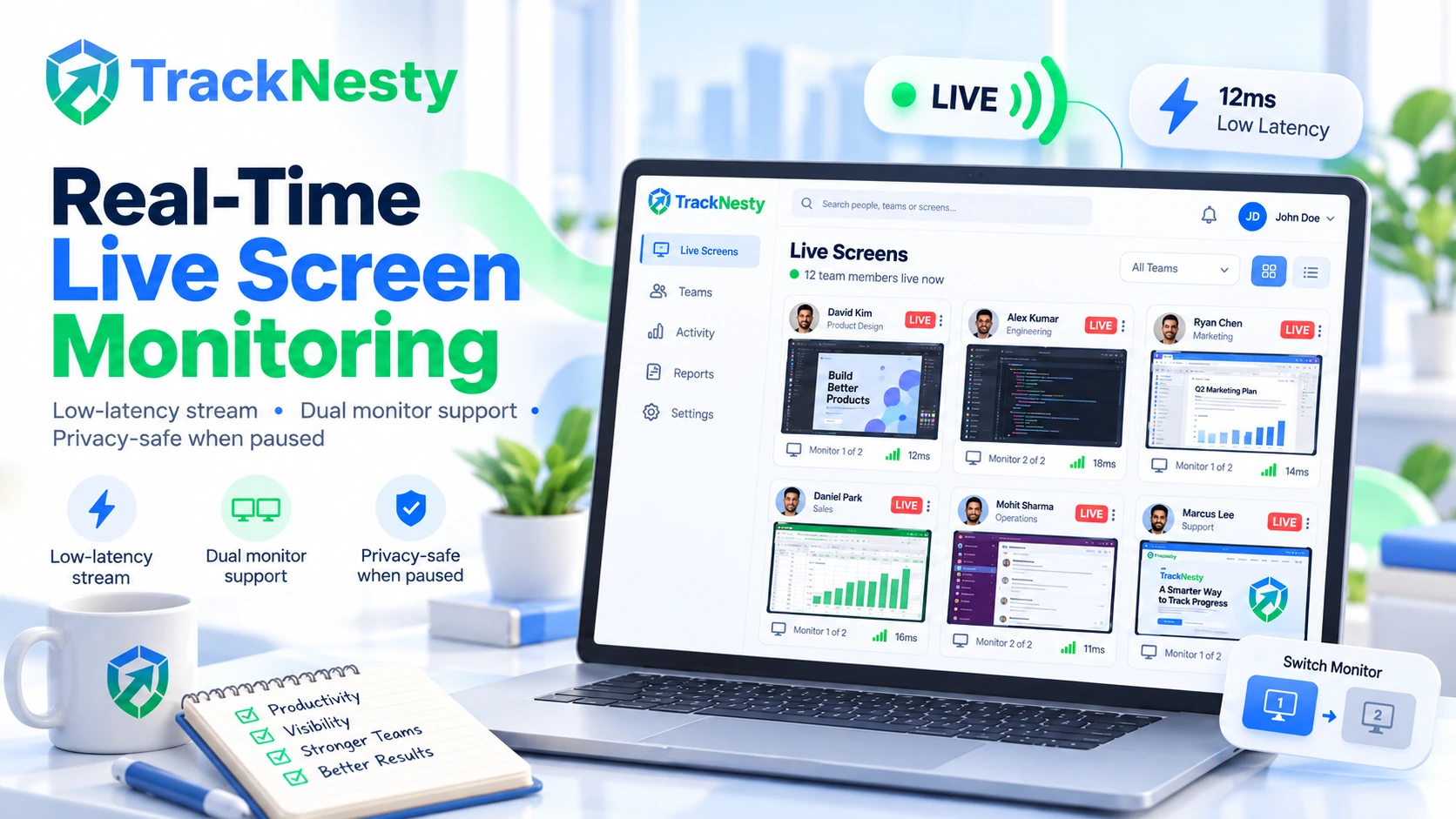
Watch what your team is working on right now in real time. TrackNesty combines low-latency live screen monitoring with transparent employee monitoring software, instant dual monitor switching, and complete worker privacy without disruptive status check meetings.
What Is Live Screen Monitoring Software?
Live screen monitoring software allows authorized managers to view an employee's active computer screen in real time while the employee is working. Unlike periodic screenshot monitoring, which captures images at scheduled intervals, live monitoring provides an immediate, continuous view of the current desktop.
Rather than waiting for delayed snapshot batches or parsing historical logs, supervisors can observe ongoing tasks as they unfold, identify operational roadblocks on the spot, and provide hands-on remote guidance with zero latency. This works alongside automated employee time tracking and employee productivity monitoring for end-to-end visibility.
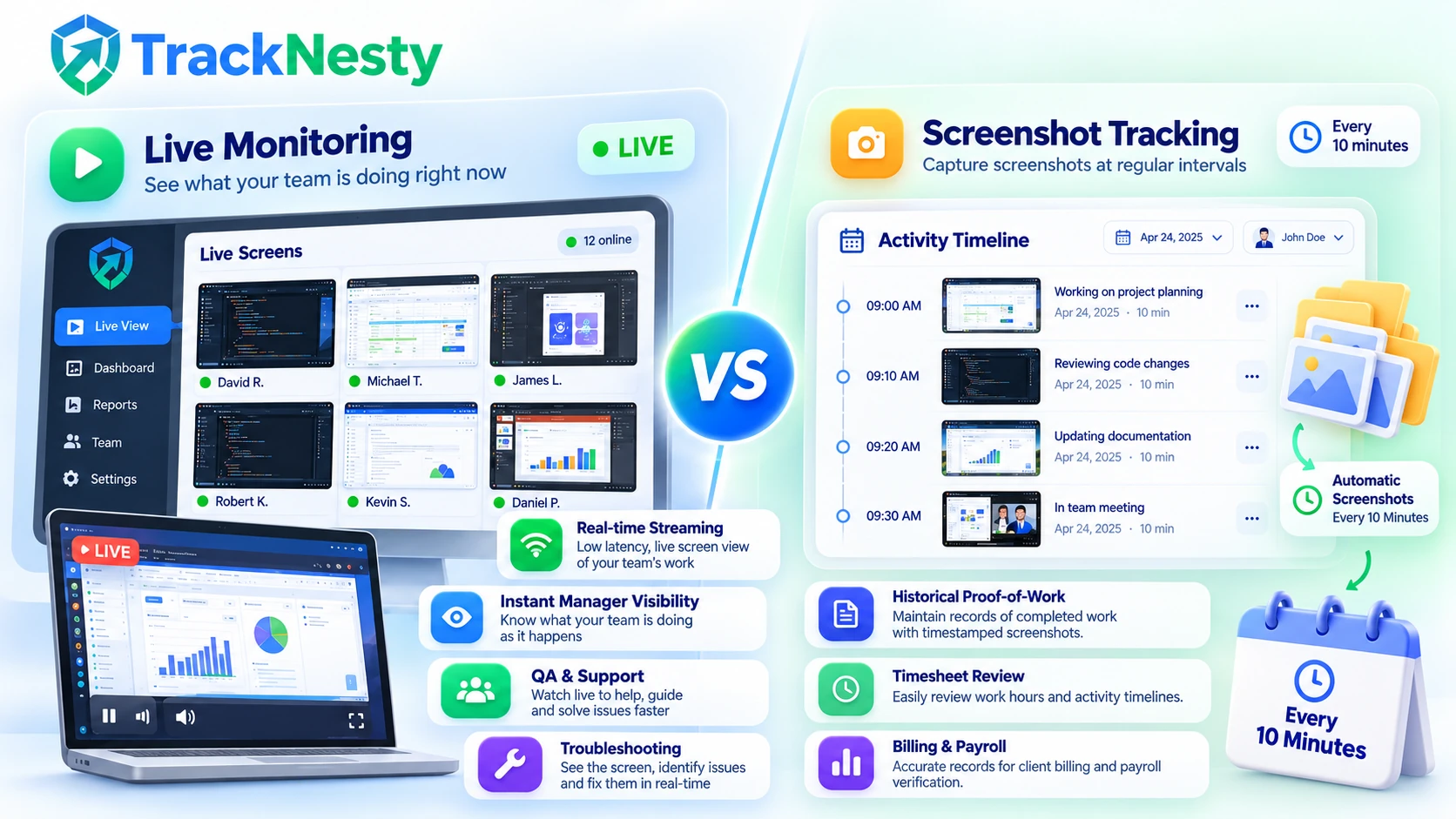
Live Monitoring vs. Screenshots
Continuous, zero-latency desktop streaming designed for active supervision and direct collaboration.
- →Real-time screen: Continuous, live view of active windows and workflows with zero delay.
- →Manager watches current activity: Instant situational awareness without waiting for delayed batch uploads.
- →Useful for QA, training & support: Spot-check support calls, unblock stuck team members, and accelerate new hire onboarding.
Automated static snapshots captured periodically to build a permanent, chronological proof-of-work archive.
- →Periodic image capture: Captures static screenshots at fixed or randomized intervals (e.g. 10 minutes).
- →Historical proof of activity: Creates a verifiable, searchable audit trail of past work hours and deliverables.
- →Useful for timesheets, billing & review: Feeds directly into employee timesheet software to protect client invoicing, verify contractor hours, and eliminate billing disputes.
Why Teams Choose Tracknesty for Live Screen Monitoring
Fast, respectful real-time screen monitoring built to help remote managers guide teams without micromanaging.
Real-Time Live Screen Stream
Watch active work screens right now as it happens. Real-time live screen monitoring seamlessly pairs with employee monitoring software so you never have to wait for 10-minute delayed screenshots.
Dual Monitor Screen Monitoring
Employees use multiple displays? Switch between Screen 1, Screen 2, and extra monitors in one click while logging apps with employee app monitoring.
Fast & Lightweight Desktop App
Runs quietly in the background with <1% CPU overhead. Works with built-in anti-bypass protection to ensure genuine desktop activity without system freeze.
Privacy-Safe Live Monitoring
Live screen monitoring only streams when the work timer is running. When employees pause for lunch, automated idle time tracking stops streaming instantly.
Real-Time Live Screen Streaming with Dual-Monitor Support
Watch active computer screens in real-time with sharp 24 FPS streaming and zero desktop drag. Switch between Monitor 1, Monitor 2, and extra displays with one click to unblock team members without interruption, verified through employee app and URL tracking.
- Watch real-time live screen streams with smooth frames and sharp text.
- Switch between Monitor 1 and Monitor 2 in one click for multi-display setups.
- Conduct hands-on QA and spot operational blockers before deadlines are missed.
1-Click Multi-Monitor Switching & Real-Time QA Audits
Modern engineers, designers, and contact center agents operate multi-screen setups. Tracknesty provides instantaneous, 1-click toggling between active monitors so managers never miss important context across secondary screens.
- Instant toggle across Primary, Secondary, and extended displays without delay.
- Live stream quality assurance audits for customer support escalations.
- Integrated with BPO workforce tracking to ensure complete queue adherence.
Who Uses Live Screen Monitoring Software?
From high-volume BPO contact centers to agile engineering sprints, see how modern teams leverage real-time desktop visibility.
Remote Teams
Keep distributed team members in sync across global time zones. Supervisors can verify project progress asynchronously without disturbing employee focus with endless check-in calls.
BPO & Call Centers
Drop into multi-monitor agent desktops in real time during live campaigns. Spot SLA bottlenecks, verify CRM inputs, and enforce client compliance standards across all shifts.
Software Development Teams
Engineering leads can observe build failures or stuck test suites in real time, pair-program with new hires, and accelerate sprint velocity without friction.
Creative Agencies
Give retainers complete confidence. Creative directors can observe design files, Figma prototypes, and video renders as they are being crafted.
Customer Support Teams
Team leads can quietly review active chat threads or ticket resolutions in progress, providing coaching prompts via internal messaging without alarming clients.
Remote Contractors
Eliminate invoice questions and payment delays. Contractors provide immediate verification of work milestones backed by automated screenshot verification.
Is Live Screen Monitoring Safe for Employees?
Yes. When designed with transparent boundaries and consent-driven controls, live screen monitoring provides managers with operational clarity while safeguarding worker dignity, personal time, and civil liberties. Tracknesty strictly opposes covert surveillance spyware.
Zero Spyware Architecture: Built for Respectful Workplaces
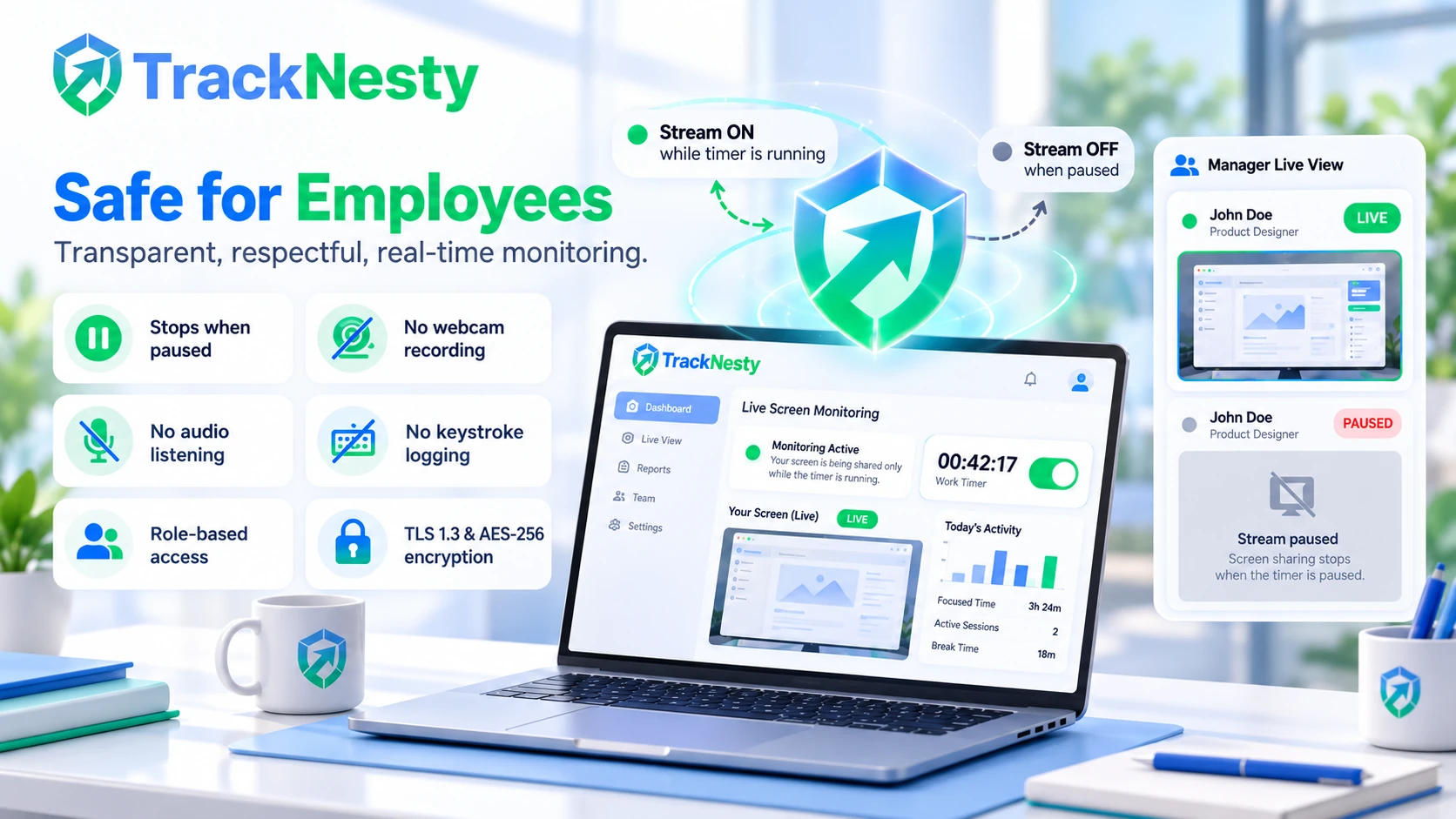
Live screen streaming only functions when an employee turns their work timer ON. The moment they step away, take a break, or clock out with employee time tracking, the stream disconnects immediately.
100% Employee Awareness & Visibility
Monitoring is never covert or hidden. Team members have continuous, visible taskbar indicators showing active timer and streaming status. Zero stealth drivers or clandestine background services.
Granular Role-Based Permissions
Only authorized direct supervisors and designated workspace administrators can view active work streams using role-based access. Screen feeds are never exposed to peer colleagues or unauthenticated accounts.
Strict Start & Stop Boundaries
Live screen streaming begins solely when the employee clicks "Start Timer" on an assigned project. The stream terminates the exact millisecond the timer is stopped or paused.
Breaks & Personal Time Isolation
Intelligent idle time tracking software prompts automatic pausing during inactivity. Lunch breaks, personal doctor visits, family errands, and evenings off the clock are 100% untracked and unmonitored.
Zero Webcam or Microphone Intrusion
Tracknesty contains zero software hooks to tap into laptop cameras or listen through ambient microphones. Home workspaces, family conversations, and personal surroundings remain completely private.
Zero Keylogging or Keystroke Logging
We strictly reject keystroke interception. Tracknesty never records individual keystrokes, password fields, or personal messages. Sensitive credentials and banking details stay protected.
End-to-End TLS 1.3 & AES-256 Encryption
Live screen streams transmit directly over low-latency, encrypted WebRTC tunnels. Feeds are never cached permanently, indexed, or shared with third-party data brokers.
GDPR, CCPA & Policy Alignment
Engineered around GDPR Article 6 proportionality, data minimization, and worker right-to-access guidelines in our compliance center. Perfect for pairing with transparent workplace privacy agreements.
Live screen monitoring eliminates the need for constant status update meetings. Managers get instant visibility into work progress, which pairs naturally with employee monitoring software and employee productivity monitoring.
Zero-Spyware Privacy & Instant Break Disconnect
Tracknesty live streaming operates exclusively when the employee work timer is active. The exact millisecond a break begins or the timer pauses, all streaming terminates completely to protect worker privacy.
- Automatic disconnection during lunch, idle periods, and off-the-clock hours.
- Zero webcam access, zero microphone listening, and zero keystroke logging.
- Encrypted TLS 1.3 WebRTC peer tunnels ensuring total data security and compliance.
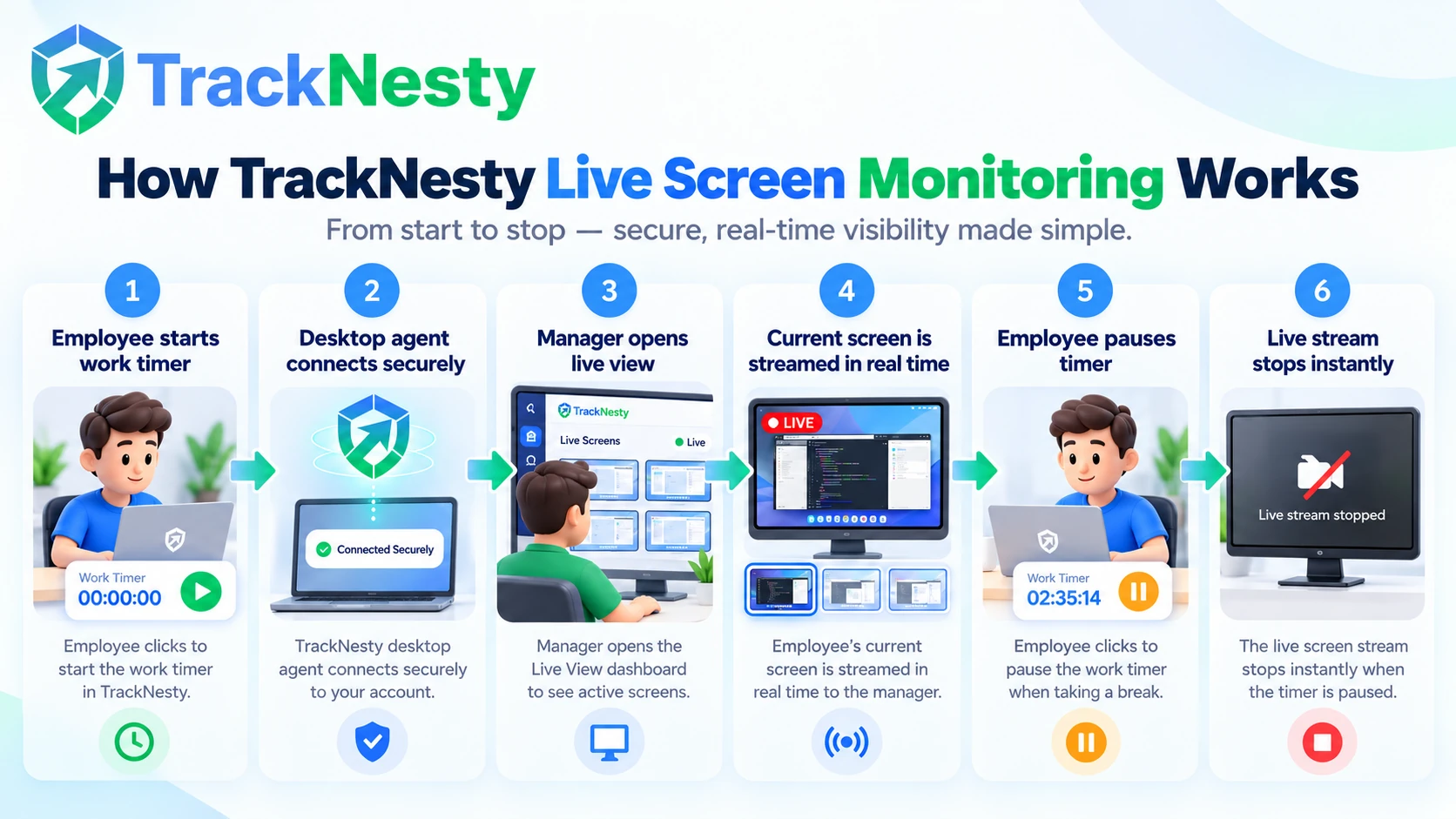
How TrackNesty Live Screen Monitoring Works
A transparent, privacy-first workflow designed to give managers real-time visibility without interrupting team flow.
1. Employee Starts Work Timer
The employee opens the lightweight desktop app and clicks start on their assigned project with automated employee time tracking.
2. TrackNesty Desktop Agent Connects
The client agent securely links with the company workspace over an encrypted, low-bandwidth WebRTC stream.
3. Manager Opens Live Screen Monitoring
The manager navigates to workforce analytics and clicks Live View to see currently active workstations.
4. Current Screen Is Streamed
Active work streams in real-time with low latency. Supervisors can switch between multiple monitors instantly.
5. Employee Pauses Timer
When the employee takes a lunch break or steps away, idle time detection prompts an automatic pause.
6. Live Stream Stops
The stream terminates the exact millisecond tracking is paused. Personal time remains 100% private and unmonitored.
Tracknesty Live Screen Monitoring vs. Older Tools
See how Tracknesty delivers smooth live screen streaming without lag or invasive spyware.
| Live Screen Feature | Tracknesty Live Screen Monitoring | Delayed Screenshot Tools | Bloated Surveillance Spyware |
|---|---|---|---|
| Real-Time Live View | ✓ Low-latency live screen stream | ❌ 10-minute delayed photos | ⚠️ Choppy 5-frame video |
| Dual Monitor Support | ✓ Switch monitors in 1 click | ⚠️ Stretches or crops displays | ✓ High bandwidth usage |
| Computer Speed Impact | ✓ Very lightweight & fast | ✓ Lightweight | ❌ Freezes PC & drains battery |
| Privacy When Paused | ✓ Stops when timer pauses | ✓ Stops when timer pauses | ❌ Secretly records after hours |
| Price per Member | $5 / user / month | $8 to $15 / user / month | $30 to $50 / user / month |
What Remote Team Leaders Say About Tracknesty
Built for remote teams, agencies, and BPOs who need transparent proof of work.
“Unlike bloated monitoring tools that overheat laptops, Tracknesty runs smoothly with less than 1% CPU overhead. The lightest monitoring agent we have deployed.”
“The real-time status dashboard shows who is online and active without sending endless status-check messages.”
“Randomized interval screenshots give our clients complete confidence in billable design hours without micromanaging our creatives.”
“Domain tracking surfaced 90 minutes of non-work browsing per agent daily. Response times and ticket resolution improved by 40% immediately.”
“Anti-bypass caught simulated mouse jigglers on day one. No more fake activity. The agent integrity check paid for itself in week one.”
Frequently Asked Questions About Live Screen Monitoring
What is live screen monitoring software and how does it differ from screenshots?
Live screen monitoring software allows authorized managers to view an employee active computer screen in real time while work is underway. Unlike periodic screenshot monitoring, which captures images at scheduled intervals for historical proof and timesheets, live monitoring provides an immediate, continuous view of current activity—making it ideal for quality assurance, training, and immediate operational support.
Is live screen monitoring safe for employee privacy?
Yes, Tracknesty live screen monitoring is built with strict privacy protections: 100% transparent employee awareness, zero webcam or microphone access, zero keylogging, automatic stream termination during breaks and personal time, role-based managerial permissions, AES-256 encrypted streams, and configurable controls designed to support GDPR data minimization principles.
Who uses live screen monitoring software?
Live screen monitoring software is used by remote teams (to monitor active work without status meetings), BPO and call centers (for live QA and rapid escalation), software development teams (for live pair troubleshooting and onboarding), creative agencies (to verify active client billable design work), customer support teams (to assist agents during complex tickets), and remote contractors (to provide transparent proof of active work).
How does TrackNesty live screen monitoring work step-by-step?
TrackNesty live screen monitoring operates in 6 transparent steps: 1) Employee starts their work timer in the desktop app, 2) TrackNesty desktop agent connects securely, 3) Manager opens Live Screen Monitoring in the dashboard, 4) Current active screen is streamed in real-time, 5) Employee pauses timer for lunch or break, and 6) Live stream stops immediately, keeping personal time 100% private.
How does live screen monitoring software work?
Live screen monitoring software lets managers open a live stream of an employee computer screen while they work. It streams active work in real-time with low latency, so you can see current tasks without waiting for delayed screenshots.
Can managers watch my screen when my timer is paused?
Never. Live screen monitoring only works when your work timer is turned ON. The exact moment you pause for lunch, take a break, or clock out for the day, the live stream stops immediately. Your personal time is 100% private.
Does live screen monitoring work with dual monitors?
Yes! If an employee has two or three monitors connected, Tracknesty lets managers switch between Screen 1, Screen 2, or view all screens together in crisp full resolution.
Does live screen monitoring slow down my computer or internet connection?
No. Tracknesty uses smart, lightweight video streaming that uses very little internet data and almost zero computer memory. It runs smoothly in the background without causing any lag.
How much does live screen monitoring software cost?
Live screen monitoring is included in Tracknesty starting at just $5 per user per month (or $4.17/mo billed yearly). You get live screen streaming, automatic timesheets, screenshots, and attendance tracking with a 7-day free trial.
Get Live Screen Monitoring for Your Team Today
Watch employee screens live in real-time with zero delay, switch between multiple monitors, and verify work without endless check-ins with Tracknesty.