A timesheet is a structured physical or digital record used by employees and employers to document the time spent working on specific tasks, projects, or shifts over a set pay period. Timesheets track regular hours, overtime, rest breaks, and attendance to help organizations maintain accurate records for payroll calculation, client billing, and operational recordkeeping.
Whether running a fast-growing software agency, managing a distributed BPO center, or coordinating hybrid shift workers, tracking time accurately is fundamental to operational success. For decades, organizations relied on physical paper punch cards or static Excel spreadsheets to log employee hours. Today, modern digital timesheets and automated timesheet software have transformed time tracking from a tedious administrative headache into an automated, streamlined workflow.
In this in-depth guide, we explore everything you need to know about timesheets: what they are, how they work step-by-step, the different types available, exact calculation formulas, common pitfalls of manual tracking, and how automated timesheet tools streamline attendance and payroll.
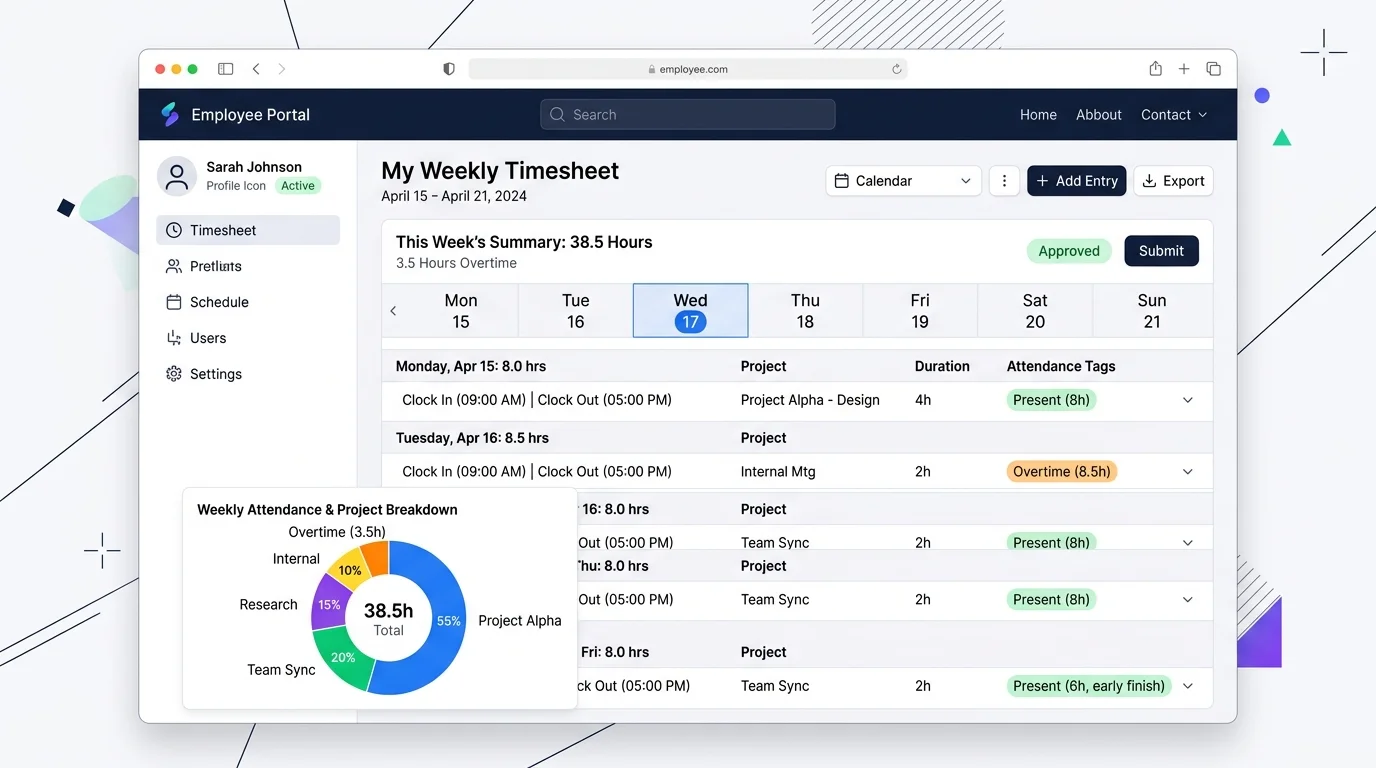
1. What Is a Timesheet and What Does It Contain?
At its core, a timesheet is a data record that captures an individual’s work duration across days, weeks, or months. Historically invented in the late 19th century during the industrial revolution as mechanical punch cards, timesheets have evolved into cloud-native databases that sync real-time productivity data across remote and on-premise teams.
While formats differ across companies, every comprehensive employee timesheet contains several essential data elements:
- Employee Information: Full name, employee ID, department, role, and assigned manager or supervisor.
- Pay Period Dates: The exact date range covered by the timesheet (such as weekly, bi-weekly, semi-monthly, or monthly).
- Daily Timestamps: Exact start time (clock-in) and finish time (clock-out) for each calendar day worked.
- Break & Meal Deductions: Duration of unpaid meal breaks or statutory rest periods deducted from total hours.
- Project & Task Codes: Specific client accounts, projects, tickets, or cost codes that hours are allocated against.
- Total Hours Category: Separation between standard regular hours and overtime (OT) hours based on company policy and local labor laws.
- Leave & Time-Off Tags: Recorded days for paid time off (PTO), sick leave, national holidays, or unexcused absences.
- Verification & Approvals: Digital or physical signatures confirming accuracy, plus supervisor sign-off before payroll processing.
2. How Does a Timesheet Work? Step-by-Step Workflow
Understanding the end-to-end timesheet lifecycle clarifies why accurate time recording is vital across human resources, project management, and accounting departments. A standard timesheet process follows six sequential phases:
Step 1: Clock-In & Start of Shift
The employee begins work and logs their starting timestamp. In traditional offices, this was done via a wall clock or sign-in sheet. In modern automated environments, a lightweight desktop agent detects computer startup or user login and records the clock-in automatically according to the employee's configured schedule.
Step 2: Activity & Task Allocation
Throughout the workday, the employee records time spent against specific projects, client retainers, or internal tasks. Some organizations also track which applications and websites are used during work hours to assess billable vs non-billable ratios.
Step 3: Break Logging & Clock-Out
When taking statutory meal breaks or concluding the daily shift, timestamps are captured to calculate gross daily hours worked minus non-billable break durations.
Step 4: Submission at End of Pay Period
At the close of the pay cycle (commonly every Friday or bi-weekly), the employee reviews their aggregated hours, verifies accuracy, and submits the completed timesheet to their supervisor for review.
Step 5: Manager Review & Dispute Resolution
The supervisor examines the timesheet against scheduled shifts, project deliverables, and attendance rules. If discrepancies arise, managers can cross-reference activity logs, screenshots, or GPS data (depending on the system) before granting formal approval.
Step 6: Payroll Processing & Invoicing
Once approved, the verified timesheet data is exported to payroll software to generate employee payslips and — for client-facing businesses — to invoicing tools to bill clients for the hours worked.
3. The 3 Main Types of Timesheets Compared
Timesheet methodologies range from basic paper documents to fully autonomous cloud systems. Choosing the right system depends on team size, working model (office vs remote), and compliance requirements.
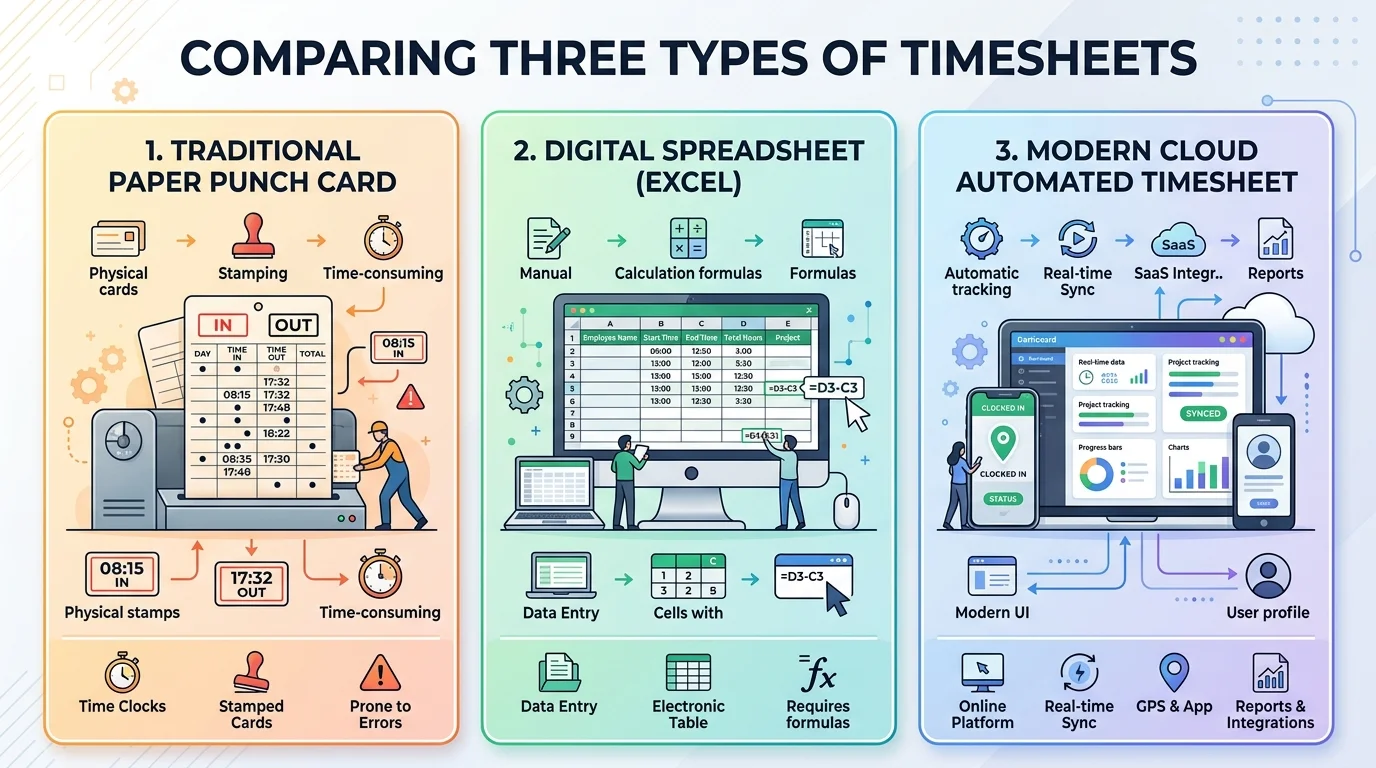
1. Traditional Paper Timesheets & Punch Cards
Physical paper cards or sign-in logbooks require employees to manually write timestamps or stamp a punch card using a mechanical time clock. While simple to introduce without computers, paper timesheets are vulnerable to physical damage, manual calculation errors, illegible handwriting, and "buddy punching" (where one worker clocks in on behalf of an absent colleague).
2. Digital Spreadsheet Timesheets (Excel / Google Sheets)
Electronic spreadsheets use pre-built mathematical formulas (like =(End_Time - Start_Time) * 24) to tally daily hours automatically. While a significant upgrade from paper, spreadsheets still rely entirely on human memory and manual data entry. Employees often fill them out at the end of the week, leading to inaccurate guesswork and accidental formula overwrites.
3. Automated Cloud Timesheet Software
Modern cloud solutions utilize lightweight desktop and mobile agents that record start times, shift attendance, active applications, screenshots, and idle periods automatically. Timesheets are generated in real time, reducing manual data entry, providing tamper-resistant tracking logs, and syncing directly with payroll engines.
| Feature / Criterion | Paper Timesheets | Excel Spreadsheets | Automated Software |
|---|---|---|---|
| Data Entry | 100% Manual (Handwritten) | Manual (Typing in cells) | Automated Background Sync |
| Error & Math Rate | High (Human math mistakes) | Moderate (Broken formulas) | Significantly Reduced (System timestamps) |
| Buddy Punching Risk | High (Zero identity check) | High (Shared passwords) | Substantially Reduced (Hardware & session controls) |
| Idle Time Filtering | None | None | Automatic (30s – 10m thresholds) |
| Admin Processing Time | 5–8 hours / pay period | 2–4 hours / pay period | Under 5 minutes (1-Click Export) |
| Remote Team Fit | Unusable for remote | Basic / Fragmented | Built for remote & hybrid BPOs |
4. Why Businesses Use Timesheets: 7 Critical Benefits
Far from being just an attendance monitoring tool, timesheets serve as an operational tool for business efficiency, recordkeeping, and financial clarity:
- Accurate Payroll Documentation: Timesheets help organizations verify hours worked and maintain structured records for payroll, helping prevent both underpayments and unverified overpayments.
- Transparent Client Invoicing: For agencies, law firms, and consulting companies, timesheets paired with proof-of-work evidence (such as screenshots or activity logs) provide verifiable documentation for retainer and hourly invoices.
- Accurate Project Costing & Estimation: Historical timesheet data reveals the true labor hours required for specific deliverables, empowering leadership to quote future client contracts with data-backed precision.
- Support for Labor Law Recordkeeping: Wage and hour regulations — including the U.S. Fair Labor Standards Act (FLSA, 29 U.S.C. § 211(c)) and the European Working Time Directive (Directive 2003/88/EC) — require covered employers to maintain contemporaneous records of hours worked, break intervals, and overtime for non-exempt staff. While recordkeeping obligations vary across jurisdictions, digital timesheets help businesses maintain structured documentation to support statutory compliance.
- Identifying Workflow Bottlenecks: Analyzing timesheet task distributions exposes time-draining administrative overhead, unproductive meetings, and unbilled idle gaps that would otherwise go unnoticed.
- Automated Leave & PTO Tracking: Integrated timesheets track accrued vacation, sick leave, and casual time off without requiring separate offline spreadsheets.
- Resource Capacity Planning: Department heads can identify overworked team members at risk of burnout and redistribute workloads proactively across their team.
According to the U.S. Department of Labor Wage and Hour Division (WHD Fact Sheet #21 / 29 CFR Part 516):
- 3-Year Record Retention: Employers must preserve primary payroll records, collective bargaining agreements, and sales/purchase records for at least three (3) years.
- 2-Year Supplementary Retention: Basic time cards, clock-in sheets, wage rate tables, and work schedules must be kept for at least two (2) years from the last date of entry.
Disclaimer: Recordkeeping rules differ by jurisdiction, industry, and worker exemption status. Organizations should consult legal counsel regarding specific labor record compliance requirements.
5. How to Calculate Timesheet Hours & Overtime
Calculating timesheet hours manually requires converting minutes into decimal fractions so they can be multiplied by hourly pay rates. Here is the standard conversion methodology:
Decimal Hours = Total Minutes / 60
• 15 Minutes = 0.25 Hours | • 30 Minutes = 0.50 Hours
• 45 Minutes = 0.75 Hours | • 60 Minutes = 1.00 Hour
Practical Example: Calculating a Daily Shift
Suppose an employee has the following daily schedule:
- Clock In: 09:00 AM
- Lunch Break Start: 01:00 PM
- Lunch Break End: 01:45 PM (45 minutes unpaid break)
- Clock Out: 06:15 PM
Step 1 (Gross Time): From 9:00 AM to 6:15 PM = 9 hours and 15 minutes.
Step 2 (Deduct Break): 9 hours 15 mins − 45 mins break = 8 hours and 30 minutes net work.
Step 3 (Convert to Decimal): 30 minutes / 60 = 0.50. Net hours = 8.50 decimal hours.
Step 4 (Calculate Pay): If pay rate is $20/hour: 8.50 × $20 = $170.00 gross pay.
Overtime Calculation (FLSA 40-Hour Rule)
Under the U.S. Department of Labor FLSA Overtime Provisions, covered non-exempt employees must receive overtime pay for hours worked exceeding 40 in a 7-day workweek at a rate not less than 1.5× their regular hourly rate. Automated timesheet software tracks cumulative weekly totals in real time, alerting managers before non-exempt personnel exceed overtime thresholds.
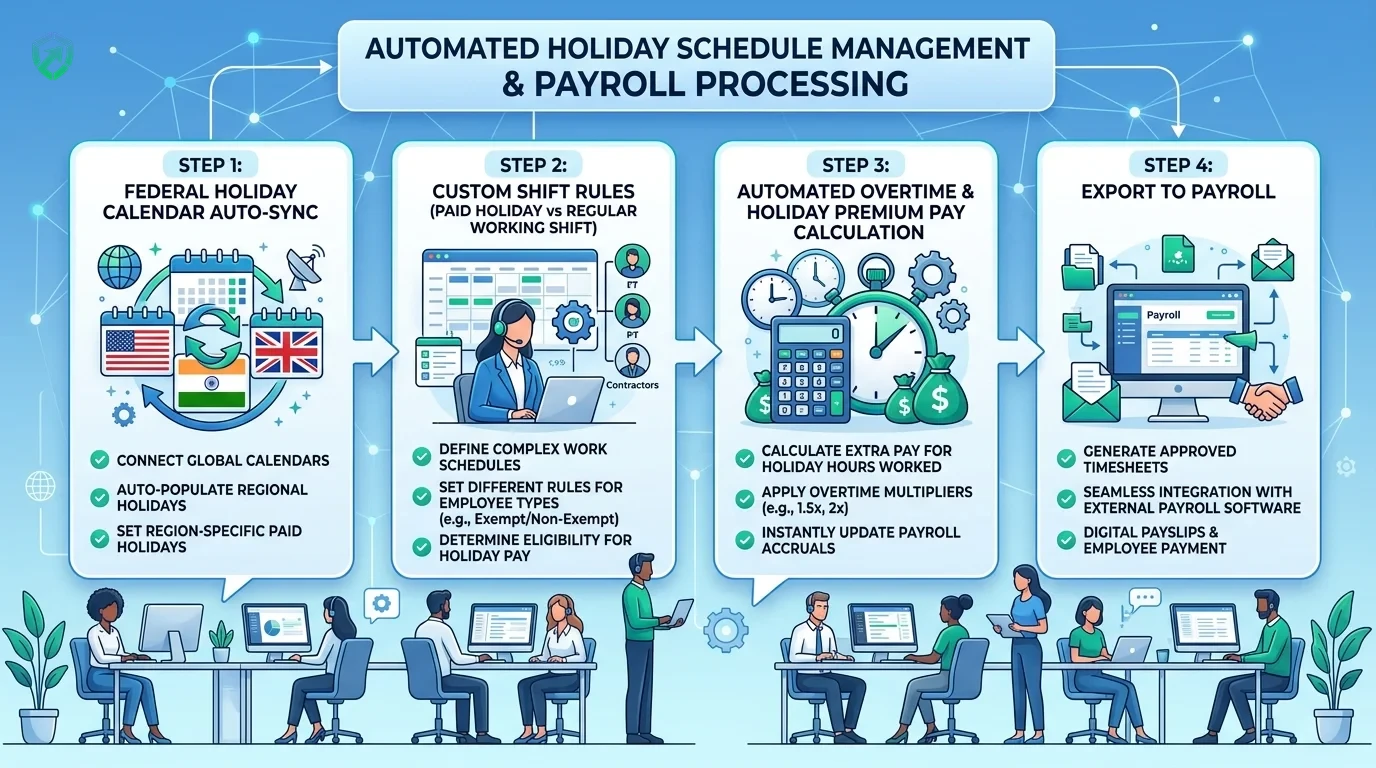
6. The Hidden Costs of Manual Timesheets vs Automated Software
Many businesses underestimate the real operational and financial losses caused by manual timesheet management. Research published by the American Payroll Association (now PayrollOrg) highlights several significant cost drivers:
- Time Theft & Manual Rounding: Unaudited manual clock-ins and casual timesheet rounding (such as adding 10–15 minutes per shift) can cost businesses between 1.5% and 5% of their total gross payroll annually.
- Administrative Processing Burden: HR and payroll administrators spend an estimated 4 to 6 minutes auditing, correcting, and manually transferring data for every single paper timesheet or spreadsheet cell.
- Late Timesheets & Billing Friction: Missing or delayed timesheets hold up invoice generation, extending accounts receivable cycles and straining client relationships.
Automated timesheet software eliminates these overheads by recording daily check-ins, filtering out inactive idle periods, capturing proof-of-work screenshots, and exporting approved hours directly to payroll — without any manual data entry. Tools like Tracknesty are purpose-built for remote teams, agencies, and BPOs looking to modernize their timesheet workflow.
7. Frequently Asked Questions About Timesheets
What is a timesheet in simple terms?
A timesheet is a physical document, spreadsheet, or digital software record used by employees and employers to record the exact time spent working on specific tasks, projects, or shifts over a given pay period.
What is the primary purpose of an employee timesheet?
The primary purpose of a timesheet is to accurately document working hours for payroll calculation, client billing, project cost tracking, and supporting employer labor recordkeeping requirements.
What is the difference between an exempt and non-exempt employee timesheet?
Non-exempt employees are legally entitled to overtime pay under statutes like the FLSA and must record exact daily start, end, break, and overtime hours. Exempt employees receive a fixed salary regardless of hours worked, but often track timesheets for project allocation and client billing.
What are 3 types of timesheets?
The 3 primary types of timesheets are: 1) Traditional Paper Punch Cards (physical cards stamped with mechanical clocks), 2) Digital Spreadsheet Timesheets (Excel/Google Sheets filled manually by staff), and 3) Cloud Automated Timesheet Software (automatic background tracking with automated timestamp synchronization).
What is the meaning of a timesheet in accounting?
In managerial accounting, a timesheet is a primary source document used to allocate direct labor costs, calculate Cost of Goods Sold (COGS), measure project profitability, and recognize billable client revenue accurately.
What information is required on an employee timesheet?
Standard statutory recordkeeping practices typically include: employee name & ID, pay period dates, daily clock-in and clock-out timestamps, recorded meal break durations, project/task allocation codes, regular vs overtime hours calculation, and supervisor review.
Is it spelled timesheet or time sheet?
Both spellings are correct and widely used. "Timesheet" (as a single compound word) is the prevailing industry standard in HR, software, and accounting documentation, while "time sheet" (as two words) is also recognized as grammatically valid.
What are the functional requirements of an electronic timesheet system?
The key functional requirements of an electronic timesheet system include automated timestamp capture, idle time deduction, anti-bypass fraud detection, role-based approval workflows, overtime multiplier rules, audit logging, and direct integration with automated payroll software.
How long must employers keep timesheet records by law?
Under the U.S. Fair Labor Standards Act (FLSA) and 29 CFR Part 516, employers must preserve payroll records for at least three (3) years, and supplementary records — including daily time cards, clock-in sheets, and wage rate tables — for at least two (2) years. Other jurisdictions and local labor statutes may impose additional retention periods.
How do you convert timesheet minutes into decimal hours for payroll?
Divide the number of minutes worked by 60. For example, 15 minutes = 0.25 hours, 30 minutes = 0.50 hours, and 45 minutes = 0.75 hours. An 8 hour and 30 minute workday equals 8.5 decimal hours.
What is an automated digital timesheet?
An automated timesheet is a cloud-based software solution that tracks employee start and stop times, active application usage, shift attendance, and idle periods automatically in the background without requiring manual data entry.
How does automated timesheet software detect idle time?
Automated timesheets monitor keyboard and mouse activity thresholds without recording private keystrokes. If an employee is away from their keyboard for longer than the set limit (e.g., 5 minutes), the idle time is automatically deducted from active work hours.
How do automated timesheets connect directly to payroll?
Once approved by a supervisor, verified timesheet hours, overtime multipliers, and deductions transfer seamlessly into automated payroll to generate 1-click payslips and bank disbursements.
8. Conclusion
A timesheet is much more than a clock-in log — it is a vital operational tool that impacts payroll accuracy, project profitability, labor recordkeeping, and employee trust. While paper and spreadsheets served businesses in the past, modern distributed teams require real-time, automated solutions that reduce manual friction and calculation mistakes.
If your team is still relying on manual timesheets, consider trialing an automated solution to see the difference firsthand. Tracknesty's timesheet software offers a free 7-day trial with no credit card required.