Data-Driven Employee Productivity Monitoring
Move beyond mere hours clocked. Measure genuine team engagement, active focus intervals, and output stamina with TrackNesty and our privacy-first employee productivity monitoring suite.
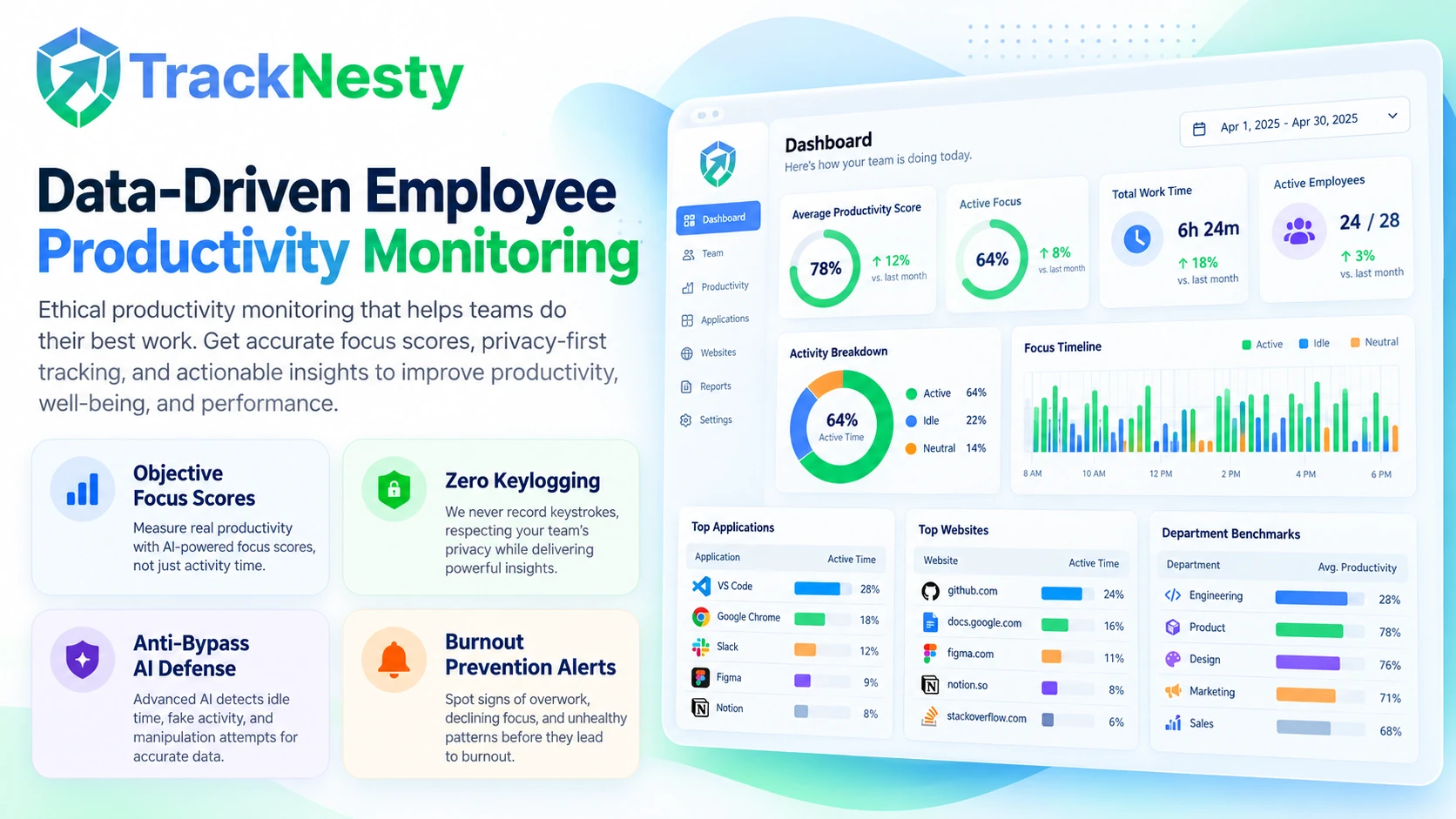
How Employee Productivity Monitoring Drives Scalable Growth
Understand when your developers, designers, and operations specialists achieve uninterrupted flow state with ethical employee monitoring software. Eliminate friction that triggers productivity drops by analyzing deep metrics from employee app monitoring and employee website monitoring. When managers need real-time operational clarity, TrackNesty's live screen monitoring software allows managers to view active employee screens in real time without scheduling disruptive status calls.
Active Input Velocity Percentages
Measure keyboard strokes and mouse movements per 10-minute slot to give objective activity proof without logging confidential private text or passwords.
Custom App & Web Categorization
Categorize desktop software with employee app monitoring and web browsing with employee website monitoring into productive, neutral, and distracting tiers.
Burnout & Overwork Detection
Identify employees working continuous 10+ hour shifts or logging uninterrupted high-stress sessions so managers can rebalance sprint bandwidth proactively.
Anti-Bypass & Jiggler Detection
Flag physical jigglers, virtual machine use, and software auto-clickers with built-in anti-bypass protection to support honest, verifiable timesheet records.
Focus Velocity & Flow State
Track uninterrupted work blocks where team members produce their highest-value output, helping teams minimize context switching and calendar clutter.
Aggregated Executive Trends
Export team productivity velocity and department benchmarks directly into comprehensive workforce analytics for strategic hiring and headcount planning.
Tracknesty never captures personal keystrokes, steals passwords, listens to audio microphones, or reads private WhatsApp/Slack messages. We compute the mathematical percentage of active interaction per minute. When work timers are stopped or team members enter breaks, all background monitoring stops immediately.
Measure True Focus Velocity Without Invasive Snooping
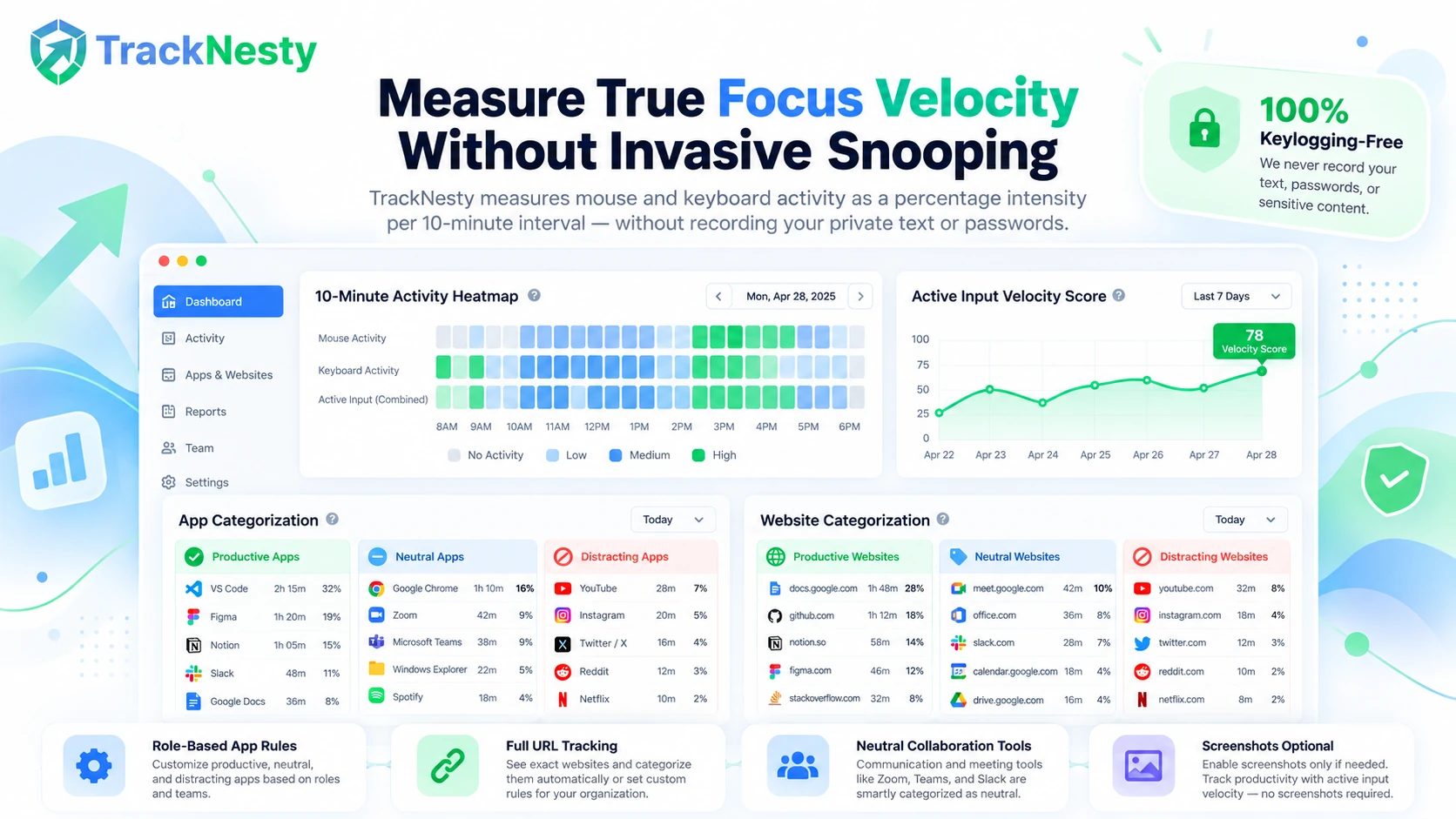
Traditional monitoring relies on creepy video logs or micromanaged stopwatch timers. Tracknesty measures genuine input velocity—calculating the percentage of seconds with mouse clicks, mouse scrolling, and keyboard actions within 10-minute intervals.
- Normalized Velocity Scores: View team activity as fair percentages (e.g. 78% active focus) rather than arbitrary keystroke counters.
- Zero Keystroke Recording: Passwords, confidential customer documents, and personal passwords remain strictly encrypted and untouchable.
- Paired with Screenshots: Validate work output effortlessly alongside our optional time tracker with screenshots.
Differentiate Deep Work From Distracting Web Browsing
Not all screen time is created equal. With Tracknesty's employee app and URL tracking, you can assign customized productivity scores to specific applications and website URLs based on team responsibilities.
- Role-Specific Classifications: Mark Figma as productive for UX designers, GitHub for software engineers, and Salesforce for account reps.
- Full URL Tracking: Distinguish client research on docs.google.com from casual browsing on entertainment media.
- Neutral Category Handling: Label internal communication tools like Slack and Zoom as neutral so team synchronization isn't penalized.
Prevent Costly Burnout Before High Performers Quit
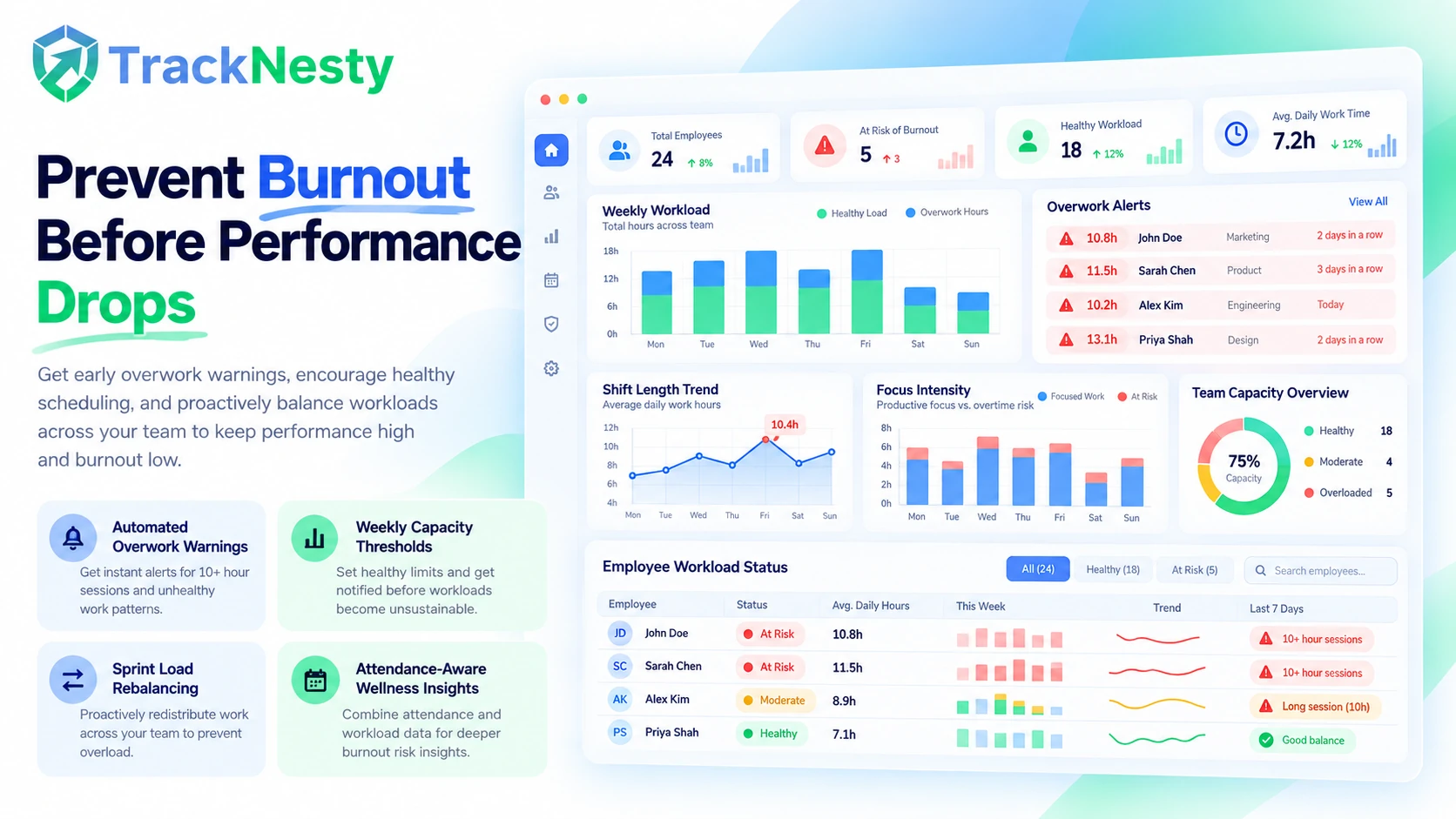
High-producing remote workers are frequently susceptible to silent exhaustion. Tracknesty monitors sustained workload intensity, flagging team members who consistently log uninterrupted 10-to-12 hour work shifts without scheduled breathers.
- Automated Overwork Warnings: Notify department leads when employees exceed healthy weekly capacity thresholds.
- Rebalance Sprint Loads: Identify overloaded team members and reallocate tasks using workforce analytics.
- Sync with Shift Attendance: Combine overwork metrics with employee attendance software for healthy scheduling.
How Tracknesty Calculates Productivity Percentages
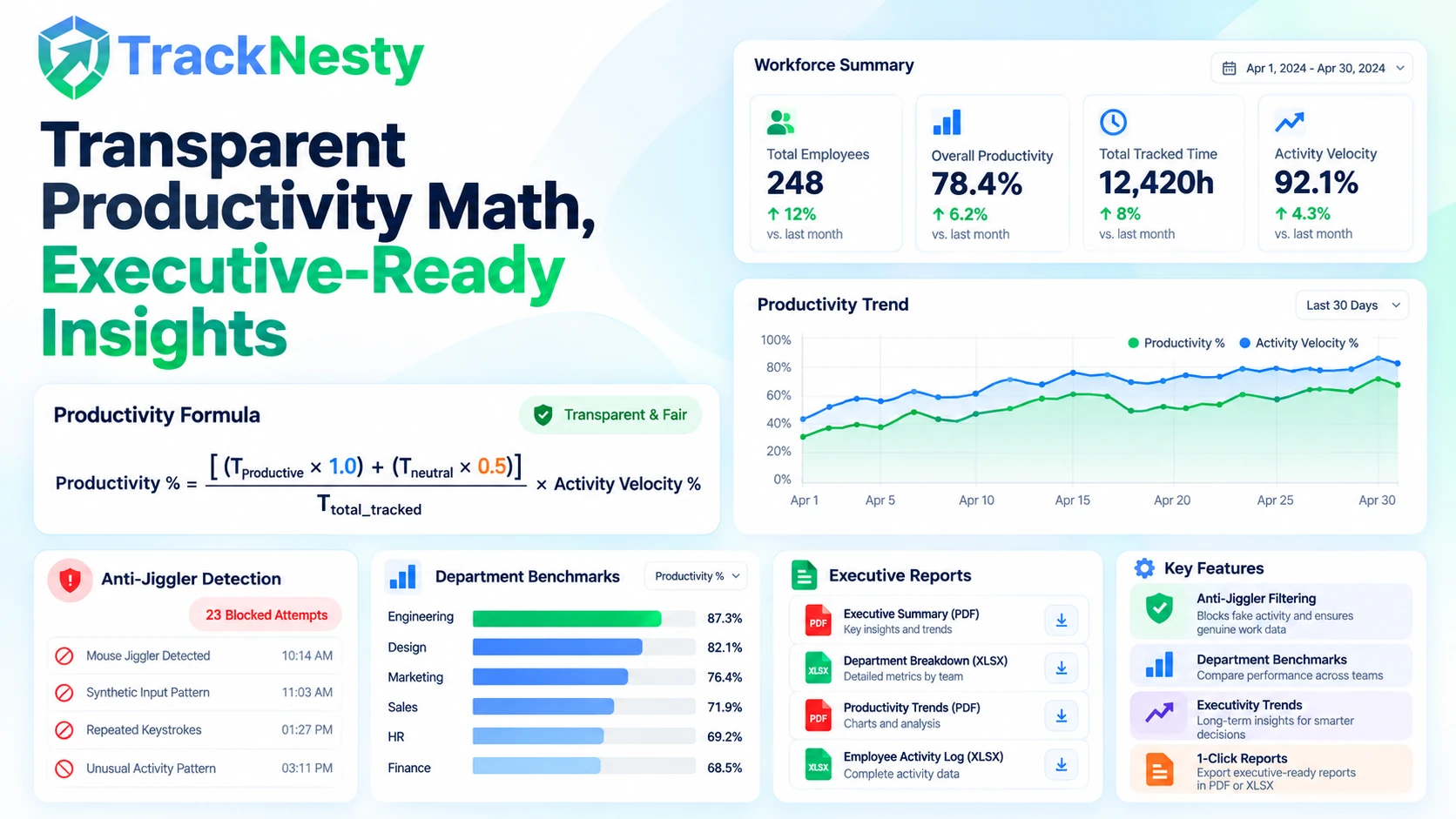
No opaque black-box scoring. Tracknesty provides open, verifiable math that employees and managers understand and trust.
Standard Weighted Productivity Score
Productivity % = [ (T_productive × 1.0) + (T_neutral × 0.5) ] / T_total_tracked × Activity_Velocity %Time spent in approved productive tools receives full credit. Neutral collaboration tools count proportionately, while idle time detected by our idle time tracking software pauses the productivity score automatically.
Active Input Detection
Calculates active seconds within each 10-minute slot via mouse and keyboard intervals.
Contextual App & Web Weighting
Applies department-specific rules so developers, designers, and reps are graded accurately.
Anti-Jiggler Filtering
Filters out artificial mouse jiggler patterns and bot scripts with anti-bypass protection.
Tracknesty vs Traditional Workplace Spyware
See how Tracknesty delivers deeper workforce insights while preserving team trust and operational morale.
| Capability / Feature | Tracknesty Productivity Suite | Traditional Time Trackers | Invasive Workplace Spyware |
|---|---|---|---|
| Productivity Velocity Metric | Keyboard & mouse percentage intensity per 10m | Random screenshot counting only | Total raw keystrokes captured |
| Employee Privacy | 100% Keylogging-free; private breaks respected | Constant webcam or invasive video grabs | Silent background keystroke recording |
| App & URL Classification | Role-specific productive, neutral & distracting tiers | Generic one-size-fits-all domain list | Rigid blocking without context |
| Burnout & Overwork Alerts | Automated fatigue warnings on 10+ hr marathons | None — rewards overworking blindly | Penalizes natural physical pauses |
| Anti-Jiggler & Auto-Clicker Defense | Flags jiggler apps & robotic mouse patterns | Easily fooled by hardware jigglers | Basic timeout triggers only |
| Self-Management Dashboard | Employees review own scores, focus & timesheets | Manager-only secret surveillance logs | Covert hidden client process |
| Starting Price | $5.00 / user / month (all inclusive) | $10.00 – $18.00 / user / month | $15.00 – $30.00 / user / month |
Productivity Tracking Built for High-Output Teams
Discover how diverse business functions apply Tracknesty to eliminate bottlenecks and optimize sprint cycles.
Protect Deep Focus & Coding Flow
Developers do their best work during 90+ minute uninterrupted focus blocks. Tracknesty highlights meeting fatigue and context switching across IDEs, GitHub, and terminal environments, helping managers safeguard coding time.
Track Queue Velocity & Resolution Stamina
Monitor agent active hours across Zendesk, Intercom, and ticketing portals. Real-time activity velocity metrics ensure coverage during peak customer support volume without requiring intrusive screen micromanagement.
Verify Billable Hours for Client Confidence
Combine creative output tracking in Figma and Adobe Suite with our project cost tracking software. Provide clients with verified, dispute-free proof of billable creative velocity.
Foster Culture Built on Honest Accountability
Eliminate anxiety around “who is really working”. Pair productivity metrics with our live screen monitoring and employee time tracking to establish transparent remote workflows.
Frequently Asked Questions About Employee Productivity Monitoring
Everything you need to know about compliance, metric calculations, and ethical monitoring policies.
How is employee productivity calculated in Tracknesty?
Productivity is calculated by analyzing the proportion of active time spent on productive applications and websites versus idle time, supplemented by continuous mouse movement and keyboard input velocity percentages. This creates an objective, weighted focus score from 0% to 100%.
Does Tracknesty log private passwords or keystroke characters?
Never. Tracknesty measures input intensity (how many keystrokes occurred per time interval) rather than capturing the actual characters typed. Passwords, confidential messages, client files, and personal credentials remain 100% private.
How does productivity monitoring help prevent team burnout?
Tracknesty includes automated burnout early-warning triggers. When team members work sustained 10+ hour shifts or log high-intensity sessions without taking natural recovery breaks, managers receive workload fatigue alerts to rebalance sprint capacity.
Can we customize which apps and websites count as productive?
Yes. Work patterns vary across roles. You can define custom productive, neutral, and distracting categories for different departments. For example, GitHub is productive for developers, Canva is productive for designers, and LinkedIn is productive for recruiters.
Can employees view their own productivity scores and focus trends?
Yes! Tracknesty is built on transparent self-management. Team members have access to their personal dashboard showing active focus blocks, peak energy hours, and daily timesheets, empowering them to eliminate distractions autonomously.
How does Tracknesty detect fake activity like mouse jigglers?
Tracknesty flags jiggler and auto-clicker apps, software-generated input, and robotic mouse patterns typical of USB jigglers, ensuring that recorded productivity scores represent genuine human cognitive work.
How does productivity data connect with project billing and payroll?
Tracked productivity scores link seamlessly with project time tracking and automated payroll. You can verify the quality of hours spent on client deliverables and export clean timesheets in one click.
How much does Tracknesty employee productivity monitoring cost?
Tracknesty costs just $5 per user per month (or $4.17/mo billed annually). All productivity tracking features, active velocity metrics, application monitoring, screenshots, and workforce reports are included with zero hidden upgrade fees.
Elevate Team Output with Tracknesty Today
Build an open culture of transparent high performance with actionable productivity insights, zero keylogging, and real-time focus velocity.