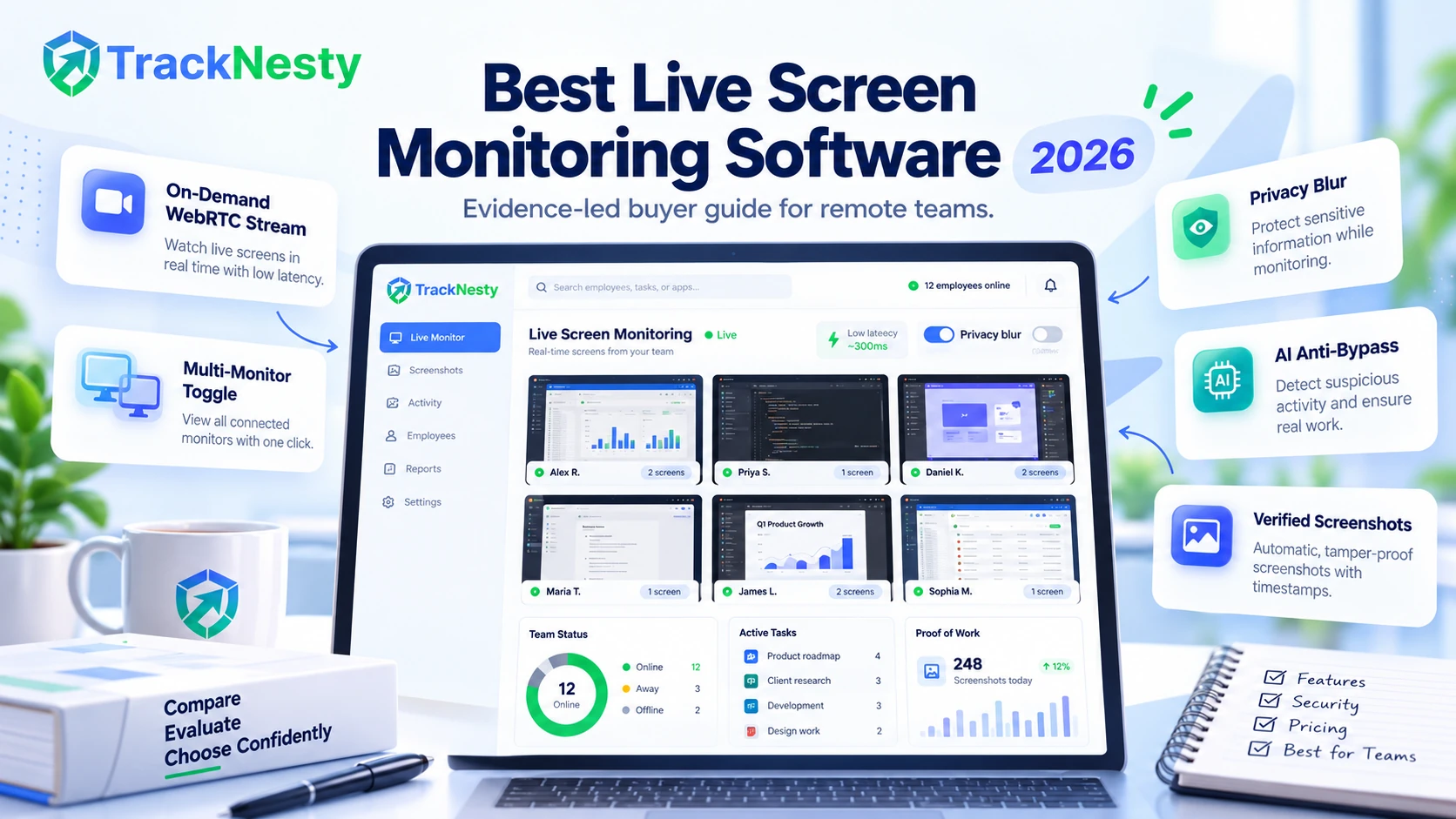
For remote organizations, BPOs, and digital agencies, real-time desktop visibility bridges operational oversight and quality assurance. Unlike legacy tools relying exclusively on static snapshot batches captured every 10 minutes, modern live screen monitoring software utilizes responsive on-demand WebRTC streaming to observe active desktop workflows with zero perceptible lag (<10 KB/s idle network overhead) and AI-driven anti-mouse-jiggler defenses.
1. Evaluation Methodology & Criteria Weighting
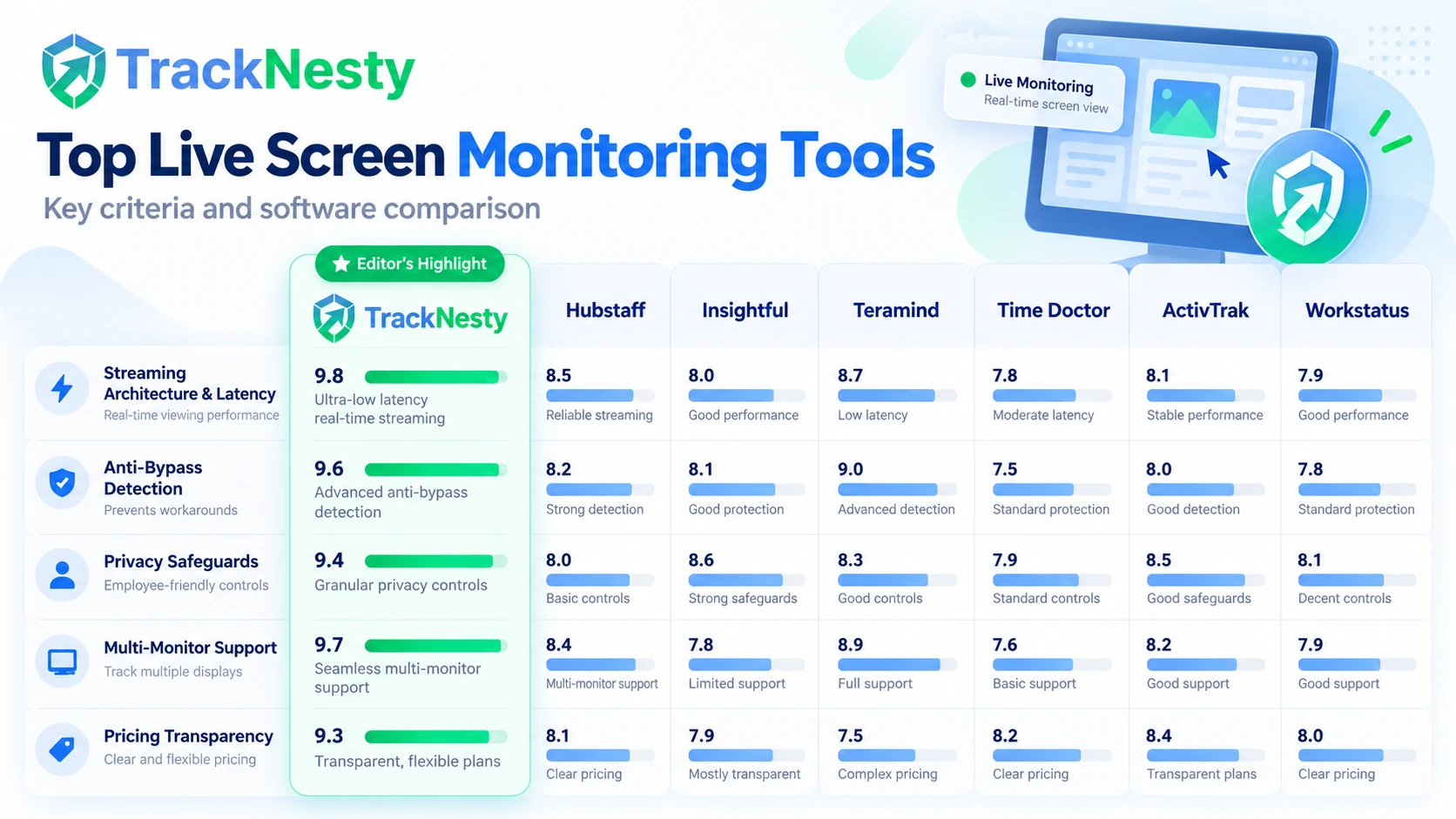
To help engineering leads, operations directors, and agency managers select the optimal tool for their distributed infrastructure, we evaluated each platform across five weighted criteria:
2. Live Screen Streaming vs. Periodic Screenshot Monitoring
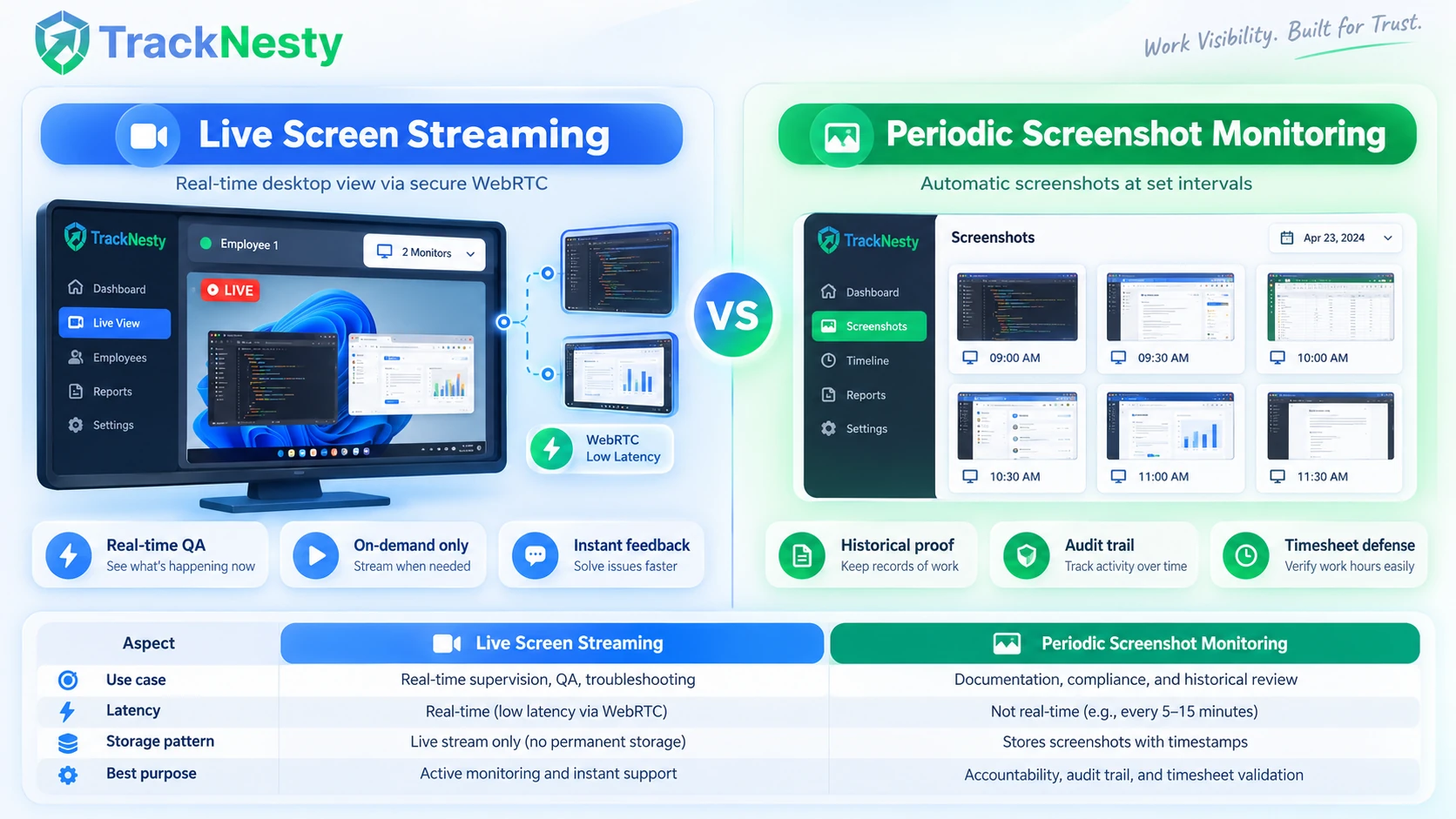
When selecting workforce supervision tools, understanding the architectural divergence between live desktop streaming and periodic screenshot capture is essential:
- Live Screen Streaming (On-Demand WebRTC): Operates as a temporary, encrypted real-time video feed between the employee workstation and authorized manager console. Initiated on demand, live streaming delivers instantaneous visual feedback for onboarding, technical troubleshooting, and live customer call QA.
- Periodic Screenshot Monitoring: Captures static image frames at predetermined intervals (e.g., once every 5, 10, or 15 minutes). These snapshots are stored in cloud storage to create a permanent, auditable visual record used for client billing verification, proof of work, and timesheet approvals via time tracking with screenshots.
Modern platforms like Tracknesty Live Screen Monitoring combine both approaches: providing on-demand live streaming for real-time operational agility alongside automated periodic screenshots for historical timesheet defense.
3. In-Depth Comparison: Top 7 Live Screen Monitoring Tools
Below is our detailed, evidence-led review of the leading employee monitoring and time tracking platforms available in 2026:
Tracknesty
Recommended Best For: Remote teams, digital agencies, and BPO operations requiring responsive live observation without heavy continuous bandwidth overhead.
- On-demand WebRTC desktop video stream for immediate operational QA and agent assistance
- 1-click toggle between primary and secondary monitor displays with zero visual latency
- AI-assisted anti-bypass engine detecting physical USB jigglers and auto-clicker macros
- Automated sensitive data blurring algorithms to protect confidential PII and passwords
- Integrated time tracking, app/URL classification, and periodic screenshot proof of work
- Transparent 7-day free trial with simple per-seat monthly/annual pricing ($5/user/mo)
Hubstaff
Recommended Best For: Field service operations, mobile workforces, and agencies needing automated timesheets with GPS verification.
- Comprehensive mobile GPS tracking and geofenced automated clock-in
- Integrated payroll aggregation and multi-currency invoicing workflows
- Extensive ecosystem of 30+ project management and accounting integrations
Insightful (formerly Workpuls)
Recommended Best For: Mid-market to enterprise companies looking for deep app/website productivity categorizations and organizational time utilization.
- Real-time visual monitoring via fast-polling screenshot refresh grid
- Granular website and application productivity classification scoring
- Flexible deployment options including visible employee mode and stealth IT deployment
Teramind
Recommended Best For: Financial institutions, healthcare compliance teams, and organizations with strict insider threat prevention requirements.
- Continuous desktop video recording with keyword-searchable OCR text recognition
- Automated Data Loss Prevention (DLP) rules blocking USB transfers and unauthorized uploads
- Administrative remote desktop takeover and interactive user warning prompts
Time Doctor
Recommended Best For: Outsourced teams, virtual assistants, and agency contractors seeking client-visible task accountability.
- Task-centric tracking integrated directly with Jira, Asana, and Trello
- Automated distraction alerts when navigating non-work URLs
- Client portal access for transparent billing verification
ActivTrak
Recommended Best For: HR leaders and operations managers assessing team burnout risk, capacity planning, and software license usage.
- Executive-level dashboards highlighting over-utilized and under-utilized employees
- Privacy-first philosophy without keylogging or intrusive camera surveillance
- Automated benchmarking across departmental teams and work shifts
Workstatus
Recommended Best For: Construction crews, field technicians, and distributed teams needing blended location and task tracking.
- Job site geofencing with automated shift clock-ins on mobile devices
- Integrated project budgeting, milestone tracking, and timesheet approvals
- Automated screenshot audit trails for invoice backing
4. Side-by-Side Technical Comparison Matrix
Evaluate key technical parameters across the top live screen monitoring solutions:
| Evaluation Metric | Tracknesty | Hubstaff | Insightful | Teramind | Time Doctor |
|---|---|---|---|---|---|
| Primary Visual Monitoring Method | On-Demand Real-Time WebRTC Stream (<1s) | Periodic Screenshots (5–10m) | Rapid Snapshot Polling (2–5s) | Continuous Video Stream & OCR | Video Clip Recording & Screenshots |
| Multi-Monitor Live Toggle | 1-Click Instant Display Switch | Screenshot Captures Only | Available on Higher Tiers | Full Multi-Screen Streaming | Included in Recorded Clips |
| Idle Network / CPU Load | Near-Zero Idle (<10 KB/s) | Low | Moderate | High (Continuous Buffering) | Moderate |
| Hardware Mouse Jiggler Detection | AI Cadence & Anomaly Analysis | Activity % Only | Rule-Based Productivity | Kernel-Level Behavioral Rules | Idle Pop-Up Notifications |
| Privacy Blurring & PII Safeguards | Configurable Automated Blur | Manual Thumbnail Blur | Enterprise Privacy Add-On | Advanced DLP Masking | Basic Screenshot Obfuscation |
| Verified Starting Price (per user) | $5.00 / mo (7-day trial) | $4.99 / mo (annual) / $7 / mo | $6.40 / mo (annual) | $11.25 / endpoint / mo | $5.90 / mo (annual) |
| Supported Desktop Agent Platforms | Windows 10, Windows 11 (64-bit) | Windows, macOS, Linux, Mobile | Windows, macOS, Linux | Windows, macOS | Windows, macOS, Linux |
5. Key Buying Considerations for Remote Teams
When auditing employee monitoring software for your operational infrastructure, verify these five critical capabilities:
- On-Demand vs Continuous Video Overhead: Continuous desktop video streaming can quickly saturate employee home Wi-Fi networks and trigger massive cloud storage bills. Prioritize architectures that transmit video streams strictly on-demand when a manager initiates a live viewing session.
- Multi-Display Coverage: Most remote software engineers, financial analysts, and designers operate dual or triple monitors. Single-display capture creates dangerous blind spots. Verify that the agent supports instant 1-click toggling between active screens.
- Anti-Bypass & Hardware Tamper Defense: Standard activity counters that rely only on basic keystroke increments can be tricked by hardware USB mouse jigglers or automated macro scripts. Choose platforms equipped with anti-bypass AI that analyzes micro-trajectories and movement cadence.
- Automated PII & Privacy Blurring: Ensure the software protects employee credentials, financial details, and customer PII by applying algorithmic blur filters to sensitive desktop regions before storing or rendering visual data.
- Transparent Employee Visibility: Ethical workforce software provides employees with full visibility into their tracked status, recorded hours, and active tasks, promoting trust rather than covert surveillance anxiety.
6. Workplace Privacy & Legal Compliance Framework
Deploying workplace monitoring software requires careful adherence to regional data privacy laws, labor regulations, and corporate governance standards. Key jurisdictional considerations include:
- United States: Governed at the federal level by the Electronic Communications Privacy Act (ECPA) alongside state-specific mandates. States such as Connecticut, Delaware, and New York require explicit written advance notice to employees before electronic monitoring commences. In California, CCPA/CPRA regulations mandate transparency regarding employee data collection and handling.
- European Union (GDPR): Regulation (EU) 2016/679 strictly regulates employee data processing. Employers must establish a clear lawful basis (typically legitimate interest under Article 6(1)(f) paired with Article 88 employment safeguards) and conduct a comprehensive Data Protection Impact Assessment (DPIA). Continuous, unannounced covert monitoring is generally impermissible, and works council consultation is often mandatory.
- United Kingdom: Regulated by the UK GDPR and the Data Protection Act 2018. The Information Commissioner’s Office (ICO) employment practices code mandates transparency, data minimisation, and proportionality—monitoring must be justified as the least intrusive means to achieve a legitimate business aim.
- Canada: Regulated under the Personal Information Protection and Electronic Documents Act (PIPEDA) and provincial statutes. For example, Ontario’s Working for Workers Act requires employers with 25 or more workers to maintain a clear written policy detailing whether, how, and in what circumstances electronic monitoring occurs.
- Australia: Regulated by the Privacy Act 1988 alongside state-specific legislation (such as the NSW Workplace Surveillance Act 2005 and ACT Workplace Privacy Act 2011), requiring written notice at least 14 days prior to commencing surveillance.
7. Frequently Asked Questions
What is live screen monitoring software and how does it work?
Live screen monitoring software enables authorized managers to view remote employee desktop screens in real time. Modern architectures use on-demand WebRTC peer-to-peer or server-relayed video streams initiated only when an administrator actively opens a viewer, minimizing CPU and bandwidth consumption compared to continuous recording.
What is the difference between live screen streaming and periodic screenshot capture?
Live screen streaming provides instantaneous visual observation of active desktop workflows for live coaching and QA. In contrast, periodic screenshot monitoring takes automated static captures at set intervals (e.g., every 5, 10, or 15 minutes) to create an auditable historical log for billing and timesheet verification.
Does live screen monitoring affect employee internet bandwidth or computer speed?
When using on-demand streaming architecture (such as Tracknesty's WebRTC protocol), screen data is transmitted only during active viewing sessions. When the viewer is closed, idle network usage remains negligible (<10 KB/s), preventing network saturation and avoiding computer slowdown.
Can live screen monitoring software detect hardware mouse jigglers?
Standard activity trackers that only measure raw input counts can be bypassed by physical USB jigglers. Advanced solutions like Tracknesty incorporate behavioral cadence analysis and machine-learning anomaly detection to flag unnatural, looping cursor trajectories and simulated inputs.
Is live employee screen monitoring legal across the US, UK, EU, and Canada?
Workplace monitoring is generally permissible when conducted on company equipment during working hours with prior written notice and legitimate business interest. However, specific legal mandates vary: the EU/UK require strict GDPR/DPA proportionality and DPIAs, the US involves state-level notice requirements (such as NY, CT, DE), and Canada requires explicit electronic monitoring policies.
How does live screen monitoring handle dual or triple monitor setups?
High-tier tools provide 1-click display toggles allowing supervisors to seamlessly switch between Monitor 1, Monitor 2, and external ultrawide screens in real time without lag, eliminating visual blind spots for technical and creative teams.
8. Conclusion: Choosing the Right Live Screen Monitoring Solution
Live screen monitoring has transformed from a clunky, bandwidth-heavy surveillance tactic into a nimble, cloud-native coaching and verification engine. For teams that require instantaneous desktop observation without saturating worker bandwidth, Tracknesty's on-demand WebRTC live stream engine provides the ideal balance of speed, anti-bypass integrity, and privacy protection.
Ready to upgrade your remote team's visibility? Start your free 7-day trial with Tracknesty today and discover effortless real-time monitoring.