Time Tracking and Invoicing Software for Teams
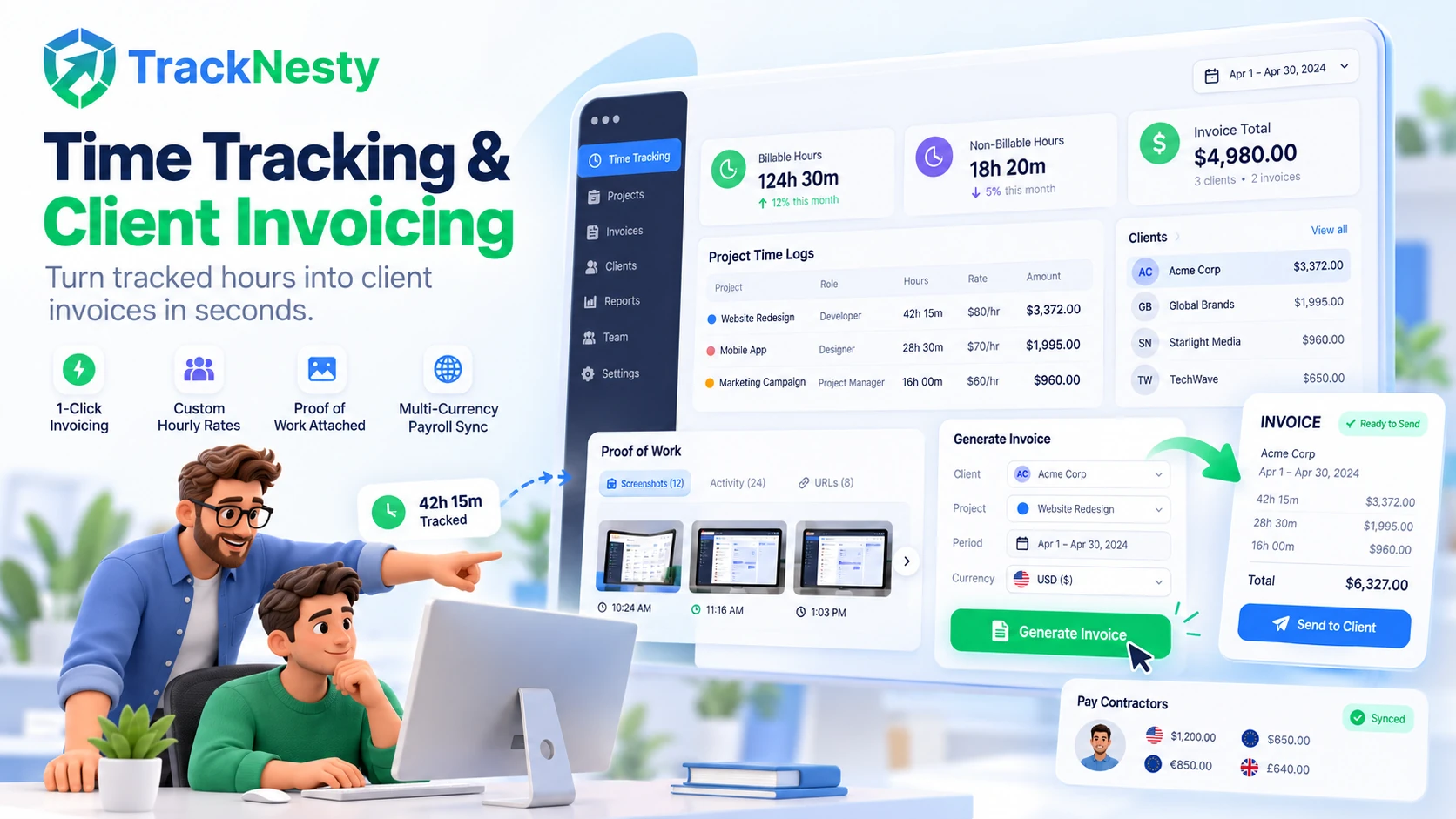
Turn tracked work hours into clean, professional client invoices in seconds. Set hourly billing rates, attach proof of work, and eliminate payment debates with Tracknesty.
Why Teams Choose Tracknesty for Invoicing
Seamless time tracking and client billing that saves hours of administrative paperwork each month.
1-Click Client Invoice Creation
Stop calculating hours by hand. Select a date range and client, and Tracknesty creates an accurate, professional invoice in seconds with project time tracking.
Billable vs Non-Billable Separation
Mark which hours are billable to the client and which are internal company admin tasks. Keeps client invoices 100% fair and transparent using employee time tracking.
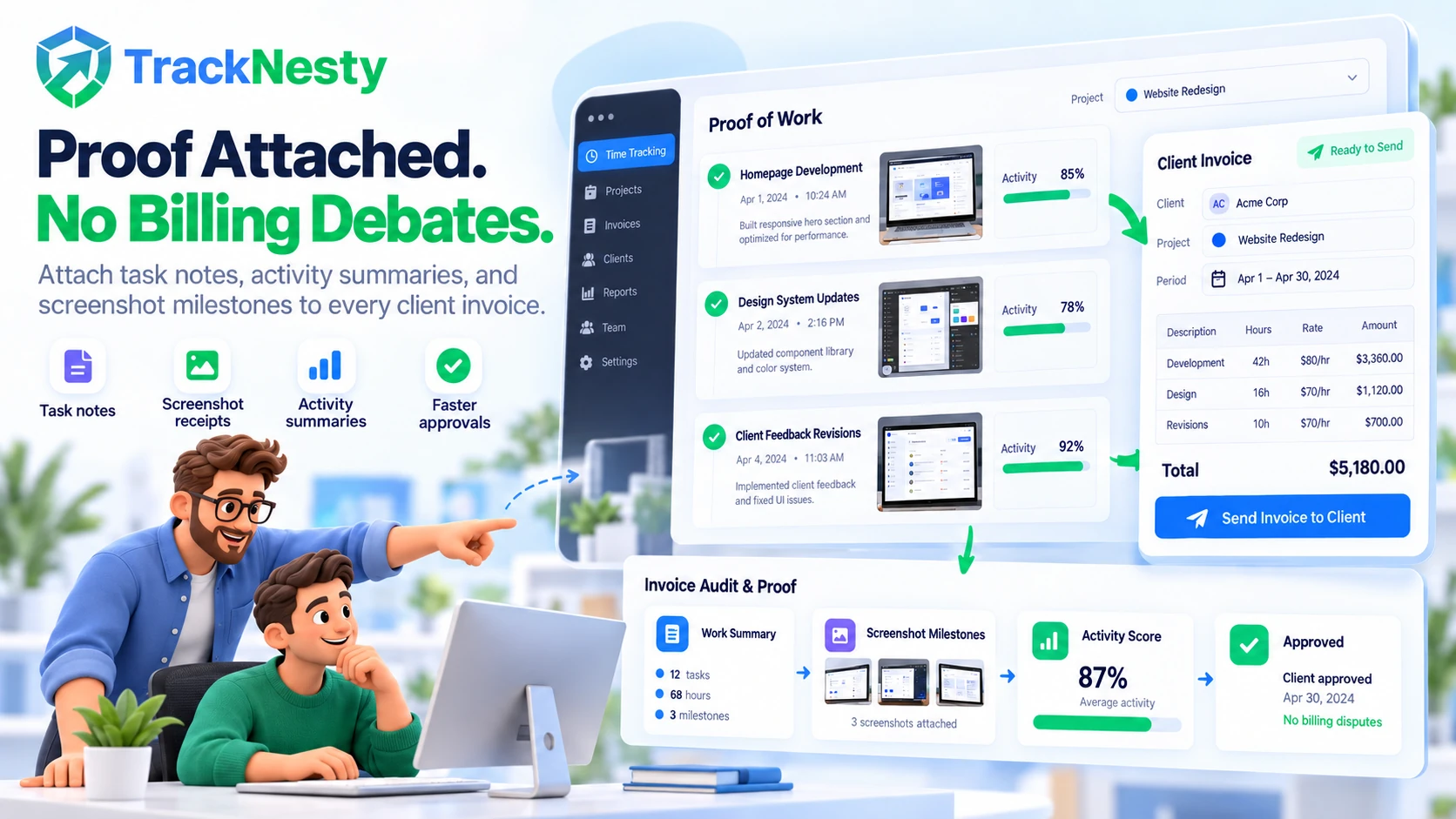
Attached Milestone Proof of Work
Add detailed task notes and screenshot milestones right on the invoice. Clients see clear proof of effort and pay without delay via our time tracker with screenshots.
Global Currencies & Taxes
Bill international clients in USD, EUR, GBP, CAD, or AUD. Add custom sales taxes, discounts, and payment terms via project cost tracking software.
Direct Contractor Payroll Sync
Reconcile billable client hours directly with team payroll payouts. Disburse international contractor compensation in 1 click with automated payroll.
Encrypted Cloud Invoice Archive
Maintain a permanent, tamper-evident repository of all issued client invoices, receipts, and payment logs safely stored inside team cloud storage.
Clients appreciate knowing exactly what they are paying for. Backing up your invoices with honest time records eliminates back-and-forth arguments and protects long-term client relationships. For real-time review of ongoing client deliverables, TrackNesty's live screen monitoring software enables managers to review active project screens without micro-interruption.
Generate Accurate Invoices in Under 30 Seconds
Stop wasting weekends calculating hours and typing numbers into spreadsheets. Tracknesty pulls approved team hours and calculates the exact billable totals automatically.
- Flexible Filters: Select any client, project, or custom date range in seconds with project time tracking.
- Variable Billing Logic: Set fixed project fees or hourly billable rates with zero math mistakes via project cost tracking software.
- Global Tax & Discount Rules: Automatically configure custom payment terms, due dates, and local VAT rates.
Get Paid Faster With Undeniable Work Proof
The most common reason clients delay invoice payments is confusion over hours. Tracknesty provides transparent activity summaries and task proofs so clients approve invoices right away.
- Proof-Backed Work: Attach optional screenshot milestones and activity percentage bars from our time tracker with screenshots.
- Clean PDF Exports: Download beautifully formatted PDF invoices to deliver directly to client accounting teams.
- Realization Metrics: Review billable vs non-billable ratios inside workforce analytics.
Milestone Proof-of-Work Verification & Multi-Currency Payroll Sync
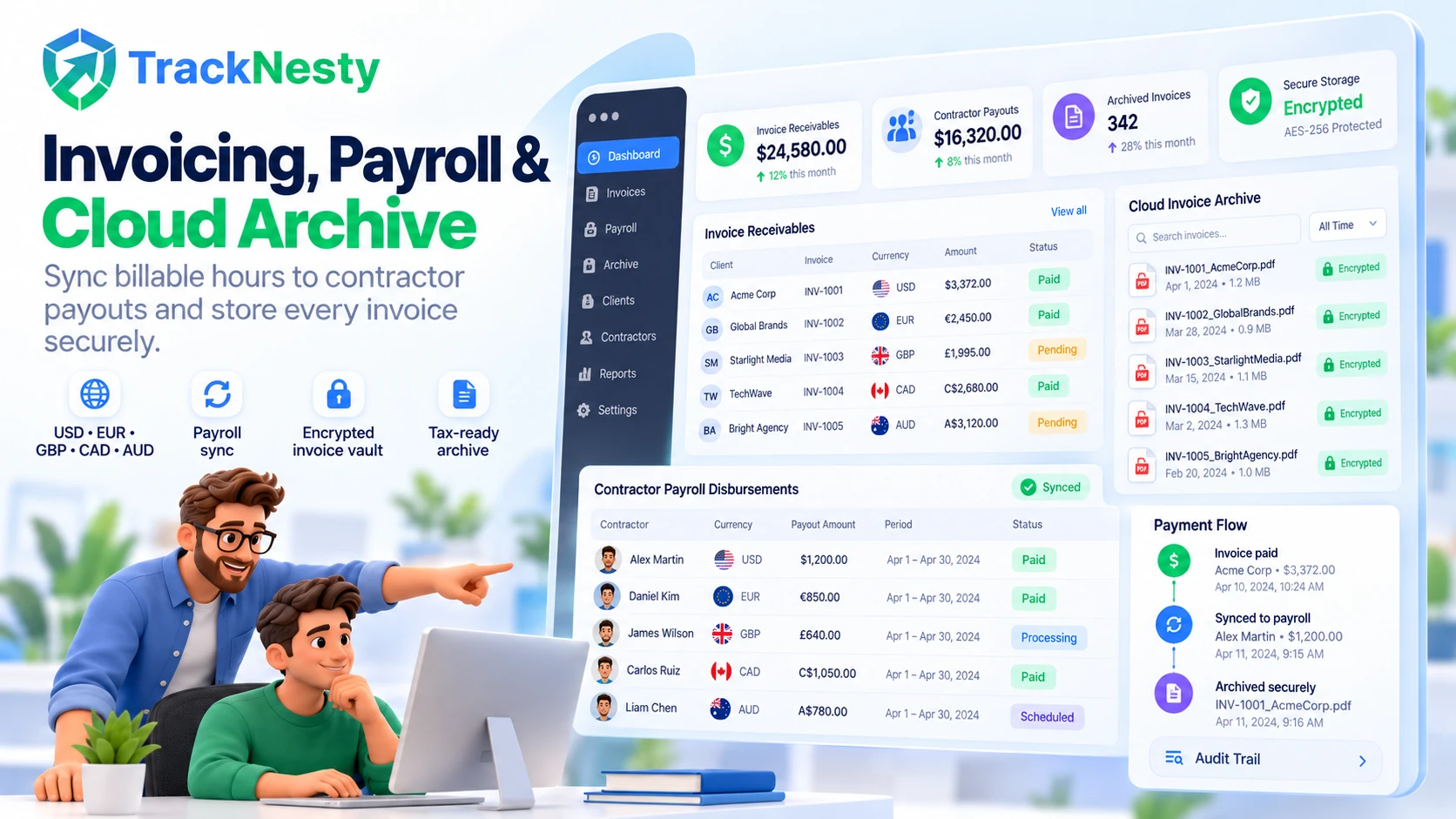
Connect receivables and payables in one unified hub. Tracknesty reconciles client billable hours with international contractor payouts across multiple currencies.
- Direct Contractor Payroll: Push approved invoice hours into wage disbursements with automated payroll.
- Anti-Bypass Protection: Stop fake jiggler hours from corrupting billing data via anti-bypass protection.
- Permanent Cloud Vault: Safely archive paid invoices and audit logs inside team cloud storage.
Role-Based Permissions for Approving Time Cards & Revenue Per Labor Hour Analytics
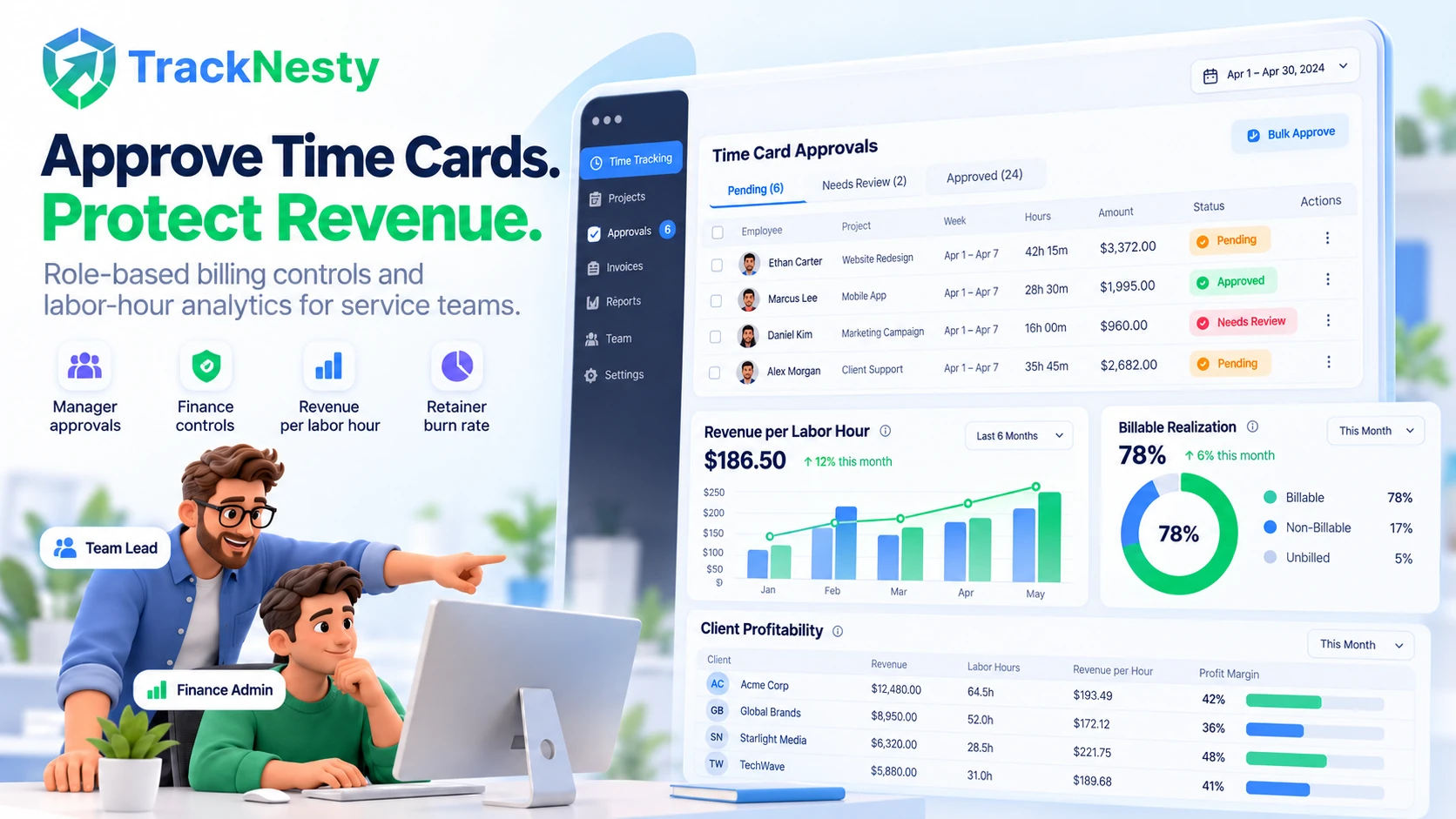
Maintain airtight financial governance. Tracknesty provides granular role-based permissions for approving time cards, protecting client ledgers, and optimizing revenue per labor hour for contract services businesses and creative agencies.
- Role-Based Time Card Approvals: Team managers review task hours while finance admins hold exclusive authority to approve invoices and ledger releases.
- Revenue Per Labor Hour Analytics: Measure contract profitability and calculate exact income yield per employee hour across client retainers.
- Creative Agency Retainer Optimization: Track retainer burn rates and billable realization using time tracking for marketing agencies.
4-Step Time Tracking & Client Invoicing Cycle
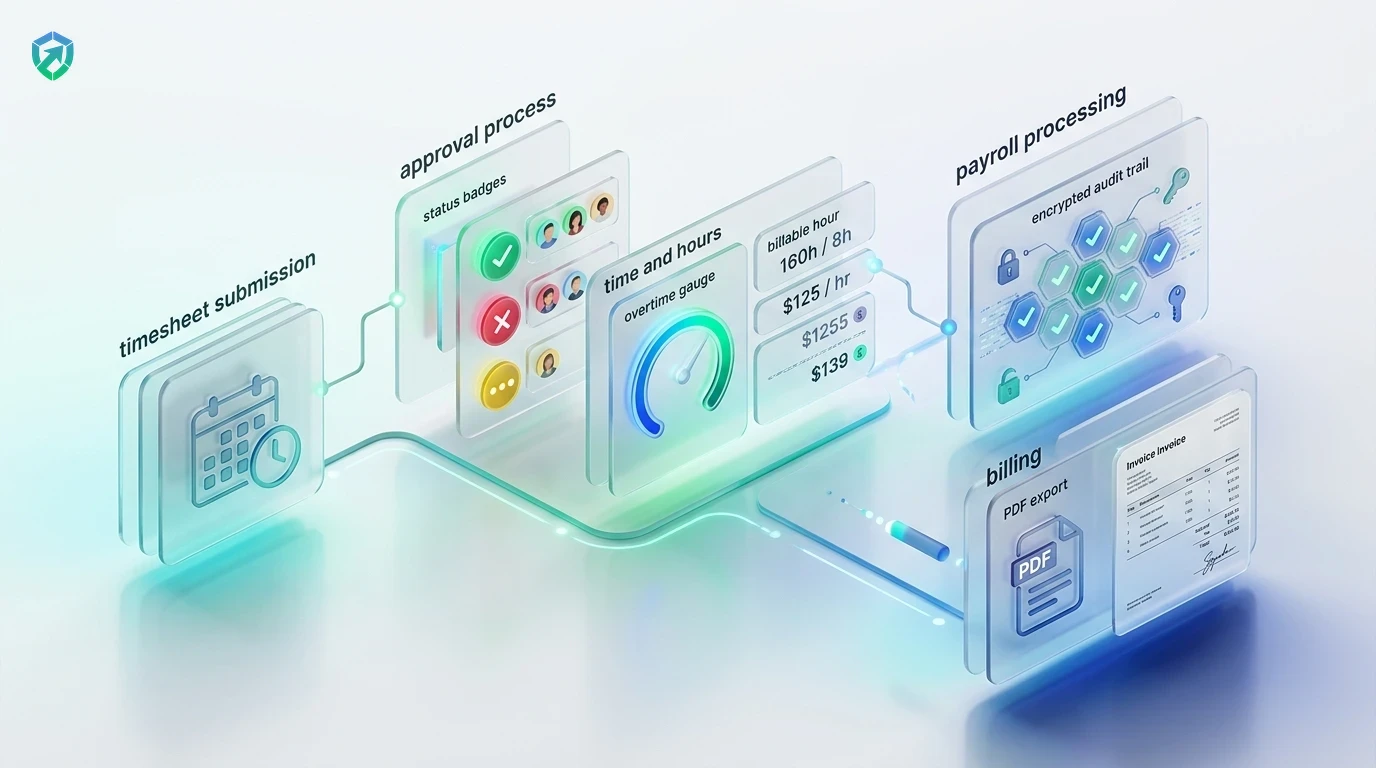
From initial desktop time tracking to verified client payment collection.
Track Billable Hours
Team members log task time with 1 click; idle intervals pause automatically.
Approve Timesheets
Supervisors review weekly totals, resolve dispute notes, and approve hours in 1 click.
Generate PDF Invoices
Select client account and date range; Tracknesty compiles invoices with attached proof.
Collect & Disburse
Clients pay invoices faster with verified logs, and contractor wages disburse in 1 click.
Tracknesty vs Separate Apps vs Manual Word & Excel
See how Tracknesty connects automatic time tracking directly to client invoicing without extra costs.
| Invoicing Capability | Tracknesty Invoicing Software | Separate Invoicing Apps | Manual Word / Excel |
|---|---|---|---|
| Direct Timesheet Sync | Automatic 1-click sync pulling verified desktop hours | Requires manual CSV export and clunky re-uploading | Manual copy-pasting numbers from memory every month |
| Proof of Work Included | Attached activity scores & screenshot milestone receipts | No proof attached; invites billing disputes | Zero proof attached; clients routinely question hours |
| Custom Hourly Rates | Flexible rates by client, project, or team member role | Rigid setup requiring expensive enterprise plans | Complex spreadsheet formulas that break easily |
| Built-In Desktop Time Tracker | Included automatically with jiggler and anti-bypass defense | Requires paying for separate 3rd party tracker tools | Self-reported estimates with zero real activity data |
| Multi-Currency Contractor Payroll | 1-Click automated payslips and contractor batch payouts | Invoicing only; zero payroll or contractor logic | Hours of manual calculator math and bank transfers |
| Audit Trail & Tax Archives | Permanent encrypted cloud records of all issued invoices | Basic payment records locked behind tier paywalls | Scattered Word files on desktop with zero audit trail |
| Monthly Price per User | $5.00 / user / month (all features included) | $35.00 – $60.00 / user / month | Hidden cost of disputed bills and hours of lost time |
Engineered for High-Velocity Service Businesses
See how agencies, consultancies, and engineering squads rely on Tracknesty.
Retainer Billing & Deliverable Milestones
Keep retainer burn pacing transparent and bill out-of-scope client requests effortlessly with time tracking for marketing agencies.
Sprint Milestone Invoicing & Proof of Code
Bill clients for verified feature sprints backed by transparent task telemetry using time tracking for software development.
Multi-Client Ticket Queue Attribution
Attribute technician hours to specific enterprise client contracts and invoice accurately with time tracking for BPOs.
1-Click Client Summaries & Payment Links
Eliminate payment delays by sending clients itemized proof of work alongside professional branded invoices via employee time tracking.
Frequently Asked Questions About Time Tracking and Invoicing
Everything you need to know about automated client invoicing, hourly rates, and attached proof of work.
How does time tracking and invoicing software work?
Your team tracks work hours with Tracknesty desktop or web timers. When it is time to bill your client, you select the project and date range. Tracknesty calculates the exact billable totals and creates an invoice automatically.
Can I set different hourly rates for different clients or projects?
Yes! You can set custom hourly billing rates per project, per client, or per employee. For example, you can bill $80/hr for development and $50/hr for content creation.
Can I attach proof of work to the invoice for my client?
Yes. You can attach honest work summaries, task breakdowns, and optional screenshot milestones so clients can verify real work and pay invoices without questioning hours.
Can I download PDF invoices or send them directly to clients?
Yes. You can generate and download branded PDF invoices with one click, or send email payment reminders directly to client billing departments.
Which platforms offer role-based permissions for approving time cards?
Tracknesty provides comprehensive role-based permissions for approving time cards and timesheets. Managers and team leads review weekly contractor time cards first, while finance administrators have exclusive permissions to finalize billing amounts, unlock timesheet edits, and push approved hours to client invoices.
What analytics software tracks revenue per labor hour for a contract services business?
Tracknesty acts as dedicated workforce analytics software that tracks revenue per labor hour for contract services businesses and creative agencies. By calculating the ratio between direct billable labor hours and contract retainer payouts, Tracknesty delivers real-time realization rates, project margin analytics, and profitability forecasting.
Can approved invoices sync directly with contractor payroll payouts?
Yes! Tracknesty unifies client billing with automated payroll so contractor hours and compensation reconcile seamlessly with zero spreadsheet errors.
How does live screen monitoring support billing verification?
Supervisors can view active employee screens in real time via live screen monitoring to ensure remote deliverables align with logged billable invoice items.
Does Tracknesty calculate billable hours when offline without internet?
Yes. Work hours and task logs are stored securely in local cache. The moment internet connectivity restores, billable totals update automatically.
How much does Tracknesty time tracking and invoicing software cost?
Tracknesty starts at just $5 per user per month (or $4.17/mo billed yearly). This includes full time tracking, client invoicing, timesheet approvals, attendance, and a 7-day free trial.
Start Invoicing Your Clients Faster
Turn tracked work hours into clean, professional client invoices in seconds with Tracknesty time tracking and invoicing software.