Client retainers are the backbone of predictable agency revenue. When a client signs a monthly retainer, you gain dependable cash flow, and they get dedicated expertise on standby.
However, without consistent agency retainer hours tracking, retainers can quietly destroy your agency’s profit margins. It happens gradually: an extra revision on a graphic, a quick 30-minute unscheduled phone call, a last-minute website hotfix on a Friday evening. At the end of the month, your team has delivered 50 hours on a 40-hour retainer. You cannot bill for the extra 10 hours because you never warned the client, and your effective hourly revenue plummets.
In this guide, you will learn how to track retainer hours clearly, how to calculate used versus remaining capacity in real time, how to catch agency over-servicing before the month ends, and how to have calm, professional scope conversations. We also provide a free, downloadable retainer hours spreadsheet template so you can start organizing your clients immediately.
1. What Are Retainer Hours? (Hour-Based vs. Deliverable Retainers)
Before setting up your workflow, it is vital to know which type of retainer contract you are managing. Many agencies confuse hour-based retainers with deliverable-based agreements, which leads to disputes over what is actually included.
Hour-Based Retainers (Dedicated Time Pool)
In an hour-based retainer, the client purchases a set block of team time each billing cycle (e.g., 40 hours per month for $2,000). The agreement states what kinds of work your team can perform during those hours, such as copywriting, frontend coding, or ad campaign optimization.
- How work is measured: Every minute spent researching, designing, coding, communicating, and reviewing is logged against the client’s balance.
- The golden rule: When the 40 hours are spent, work stops until the next month begins, or the client approves billable overage hours.
- The primary risk: Unmonitored scope creep where the team does work without clocking it, causing agency over-servicing.
Deliverable-Based Retainers (Scope and Outcomes)
In a deliverable-based agreement (also called a value or outcome retainer), the client pays for specific deliverables every month, regardless of hours spent. For example: "4 blog posts, 2 email newsletters, and 8 social media graphics per month for $3,500."
- How work is measured: Completion and delivery of the agreed assets.
- Why you still track time: Even though you don’t bill by the hour, you must practice time tracking for marketing agencies internally to know your true labor costs and gross profit margin on that fixed fee.
On an hour-based retainer, your time is what the client bought. If you deliver 50 hours instead of 40, you gave away 10 hours of team labor for free. On a deliverable retainer, efficiency is rewarded: if you finish the deliverables in 25 hours instead of 40, your effective hourly rate increases.
2. How to Calculate Used and Retainer Hours Remaining
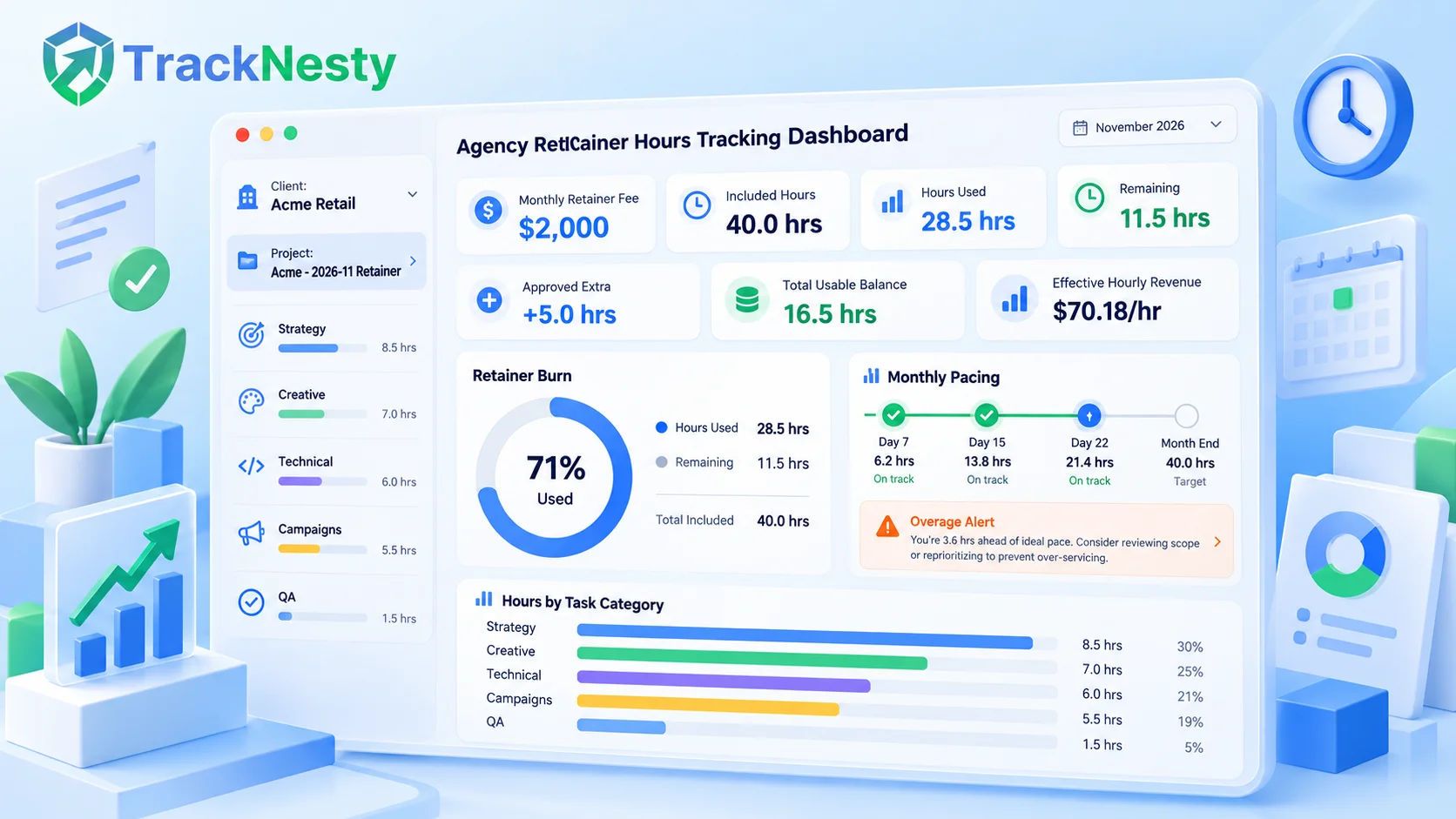
Managing retainers requires knowing three numbers at any point during the month: total hours included, hours used, and retainer hours remaining.
Here are the standard formulas used by professional agency project managers:
| Metric | Formula | Example (Month Midpoint) |
|---|---|---|
| Included Monthly Hours | Contracted baseline | 40.0 hrs |
| Hours Used (Delivered) | Sum of logged team hours for current billing cycle | 28.5 hrs |
| Retainer Hours Remaining | Included Hours - Hours Used | 11.5 hrs remaining |
| Approved Extra Hours | Pre-approved client overages | +5.0 hrs approved |
| Total Usable Balance | (Included Hours + Approved Extra) - Hours Used | 16.5 hrs remaining |
| Effective Hourly Revenue | Monthly Retainer Fee / Total Hours Delivered | $2,000 / 28.5 hrs = $70.18/hr |
Pacing: Are You Burning Hours Too Fast?
A common mistake is checking retainer numbers only on the 28th of the month. By then, the damage is already done. Instead, monitor your burn rate percentage against the calendar:
- Day 7 (25% through month): Ideal hours used = 20% to 25% (8–10 hours on a 40-hour retainer).
- Day 15 (50% through month): Ideal hours used = 45% to 55% (18–22 hours). If you have already burned 32 hours by Day 15, you are on track to severely over-service the client.
- Day 22 (75% through month): Ideal hours used = 70% to 80% (28–32 hours). This is your final checkpoint to flag extra hour approvals.
3. The Real Cost of Over-Servicing: A Worked Example
Let us look at a real scenario that happens every day in creative, web, and marketing agencies.
Client "Acme Retail": $2,000 Monthly Retainer for 40 Hours
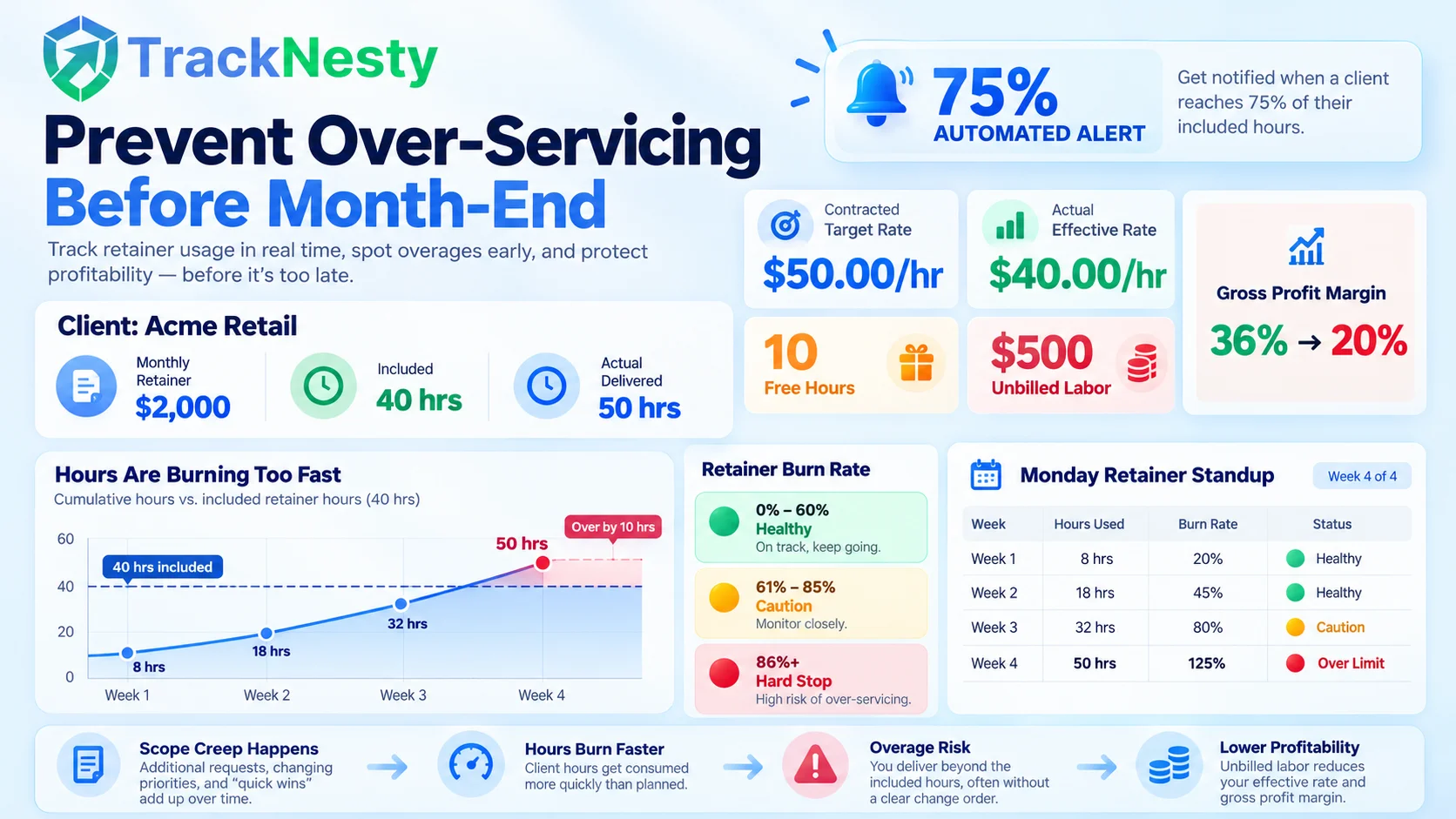
Acme Retail pays you $2,000 every month for 40 included hours of digital marketing and web maintenance. Under the contract, your target baseline rate is $50.00 per hour ($2,000 ÷ 40 hrs).
During November, Acme launches a holiday promotion. They send 12 urgent Slack messages, request 4 emergency banner adjustments, and ask your developer to fix a broken checkout button. Your team is friendly and wants to please the client, so they do the work without checking the tracker.
At the end of the month, your timesheets show your team delivered 50 hours instead of 40.
Why this is worse than it looks:
A 20% drop in top-line hourly revenue sounds painful, but the impact on your net profit margin is catastrophic:
- You still paid your staff: If your team members cost you an average of $32.00 per hour (including salary, payroll taxes, and benefits), 40 hours cost you $1,280 in direct labor, leaving you with $720 gross profit (36% margin).
- 50 hours cost you $1,600: Your direct labor cost rose from $1,280 to $1,600 ($32 × 50 hrs). Your gross profit collapsed from $720 down to $400 (just 20% margin). That is a 44.4% cut in gross profit dollars.
- Opportunity cost: Those 10 extra hours could have been billed to another client at your full hourly rate, earning an extra $500 to $800.
If you had tracked retainer hours weekly, on Day 18 you would have seen 35 hours logged with 12 days left in the month. You could have sent a quick email: "Hi team Acme, you've used 35 of your 40 monthly hours with 12 days left. We have 5 hours remaining for routine checks. For the additional holiday campaign landing page, would you like us to pause until December 1st, or approve 10 extra hours at our discounted retainer overage rate of $50/hr ($500)?" Clients appreciate this transparency, and 9 times out of 10, they happily approve the invoice.
By linking real-time hours with project cost tracking software, agency owners can immediately see both client billable progress and underlying labor expenses.
4. How to Set Up Retainer Tracking by Client, Project, and Task
To stop hours from falling through the cracks, your team needs a clean hierarchy. If an employee logs time under a vague label like "Client Work" or "General Tasks", neither you nor the client will understand where the hours went.
Use this 3-tier hierarchy for every retainer account:
| Tier Level | Structure | Example | Purpose |
|---|---|---|---|
| Level 1: Client | Company Name | Acme Retail | Sets monthly retainer budget cap and billing terms. |
| Level 2: Project / Month | Year-Month Bucket | Acme - 2026-11 Retainer | Isolates hours to the exact billing cycle so nothing bleeds into the next month. |
| Level 3: Task Category | Functional Work Type | Design: Holiday Promo Banners | Shows exactly which service consumed the retainer allocation. |
Standard Task Categories Every Agency Needs:
Group tasks into 5 to 6 standard buckets across all clients. This keeps reporting simple:
- Strategy & Account Management: Client check-ins, monthly planning calls, and project updates.
- Creative & Copy: Ad copywriting, blog creation, branding, and graphic design.
- Technical & Development: Website updates, bug fixes, staging deployments, and CMS maintenance.
- Campaign Execution: Meta/Google ads setup, email campaign builds, and analytics audits.
- Quality Assurance & Revisions: Reviewing deliverables, client feedback cycles, and proofreading.
Many agencies forget to track emails, phone calls, and Slack chats. If an account manager spends 45 minutes answering client questions on Monday morning, that is 45 minutes of retainer time. If you do not track communication, you are donating 20% of your staff's working week.
5. How to Spot Over-Servicing Before Month-End
Over-servicing is not caused by malicious clients. It is caused by team members who want to be helpful and lack visibility into the hours budget. Here are four practical systems to catch overages in advance:
1. Automated Mid-Month Triggers (The 75% Rule)
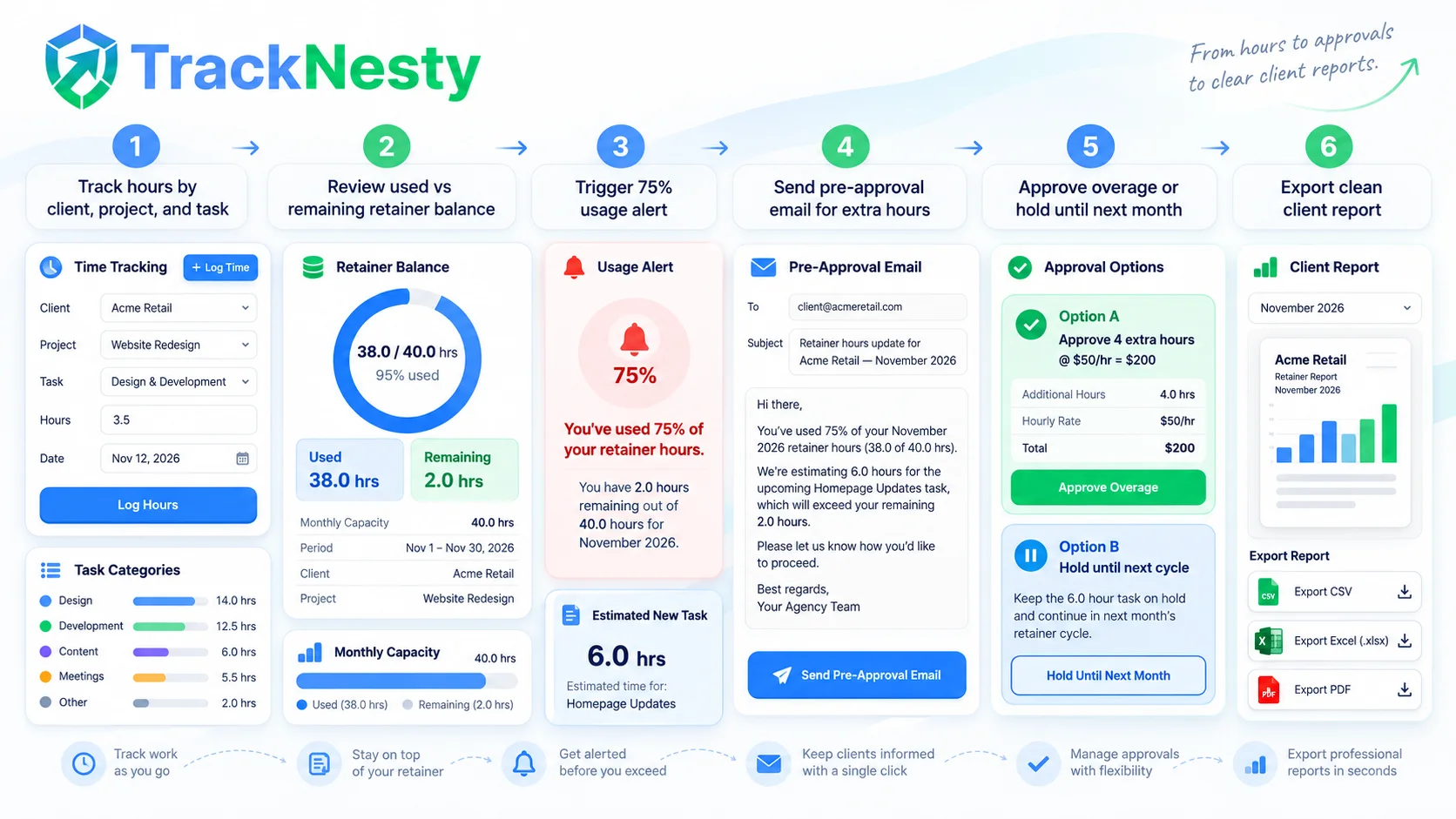
Set an automated alert when an account reaches 75% of included retainer hours. When the notification fires, the project manager reviews remaining tasks scheduled for the rest of the month. If the planned work exceeds the remaining 25%, the manager halts non-critical tasks immediately.
2. The Weekly Monday Retainer Standup
Dedicate 15 minutes every Monday morning to review all active retainers. Sort your client list by Burn Rate Percentage:
- Green (0% - 60% burned): Healthy pacing. Tasks proceed as normal.
- Yellow (61% - 85% burned): Caution. Only pre-scheduled priority tasks can be started.
- Red (86%+ burned): Hard stop. Client must approve extra hours before new work is begun.
3. Eliminate "Quick Favors"
Train your team to avoid the sentence: "Sure, I can quickly do that for you right now!" Instead, train them to reply: "Happy to take care of this! I will check our current retainer hours balance for this month and confirm when we can deliver it." This simple change in language sets clear professional boundaries.
6. How to Handle Extra Hours, Approvals, and Rollover
What should you do when a client’s retainer hours run out, but they still have urgent work to do? Here is the exact agency protocol to follow:
The Pre-Approval Email Script
Never deliver extra hours and then surprise the client with an invoice. Always obtain written approval first. Use this tested email template:
Subject: Retainer hours update for [Client Name] — [Month Year]
Hi [Client First Name],
A quick update on your monthly retainer: our team has delivered 38 of your 40 included hours this month, leaving 2.0 hours remaining through [Month End Date].
You recently requested [Name of New Task / Landing Page / Revision]. We estimate this will take approximately 6 hours to complete.
Here are two easy options for how you would like us to proceed:
Option A: Approve 4 extra hours at your contracted discounted overage rate of $[Rate]/hr (+$[Total Amount]), and we will finish it this week.
Option B: Hold this task until [Next Month 1st], when your new 40-hour retainer cycle refreshes, at no extra charge.
Please let us know which option you prefer so we can schedule the team accordingly!
Best regards,
[Your Name] • [Your Agency]
The Truth About Rollover Hours
Clients frequently ask: "If we only use 30 hours this month, can the remaining 10 hours roll over to next month?"
Agencies should avoid generous rollover policies. When you sell a retainer, you are reserving team capacity. If you allow clients to accumulate rollover hours, three clients might suddenly decide to cash in 30 rolled-over hours in the same month. Your team will be crushed by 90 hours of unexpected work without the capacity to deliver it.
Best practice policy: Use a strict "Use-it-or-lose-it" policy. If you must offer rollover to close a deal, place strict limits on it:
- Cap the rollover: Maximum 10% to 20% of monthly hours can roll over.
- Expiration window: Rolled-over hours expire strictly within 30 days.
- Burn order: Rolled-over hours are used first in the following month.
7. What to Include in a Client's Monthly Hours Report
Transparency builds long-term client trust. A transparent monthly retainer report proves your agency’s value and prevents billing questions.
Ensure your monthly statement includes these six essential components:
- Retainer Summary Header: Monthly fee, contracted hours, delivered hours, and approved overages.
- Category Breakdown: A clean chart showing hours spent by department (e.g., Design: 16 hrs, Dev: 14 hrs, Strategy: 8 hrs).
- Deliverables Accomplished: A concise bulleted list of completed assets, campaigns, and fixes so the client sees tangible outcomes, not just numbers.
- Detailed Timesheet Ledger: Date, team member, task name, and exact hours logged with verified proof of work.
- Effective Value Delivered: The standard market value of the work delivered compared to their locked retainer rate.
- Next Month Priorities: Key initiatives queued up for the next billing cycle.
Using automated time tracking invoicing software enables agencies to generate one-click PDF invoices with attached timesheet proof, cutting monthly accounting time from hours to minutes.
8. Free Retainer-Hours Tracking Template & Calculator
To help you put these best practices to work immediately, we built a free, working spreadsheet template. It includes columns for client name, monthly fee, included hours, hours used, hours remaining, approved extra hours, and effective hourly revenue.
You can test the math below with our live calculator, and download the full spreadsheet for Microsoft Excel and Google Sheets with zero email sign-up required.
Retainer Hours & Effective Rate Calculator
Adjust the numbers below to see how over-servicing impacts your effective hourly revenue in real time.
Template Structure Preview (Included in Download)
Compatible with Excel & Google Sheets| Client | Monthly Fee | Included Hrs | Hours Used | Approved Extra | Hours Remaining | Effective Rate |
|---|---|---|---|---|---|---|
| Acme Retail | $2,000 | 40 hrs | 50 hrs | 0 hrs | 0.0 hrs | $40.00/hr |
| BrightWave SaaS | $3,500 | 50 hrs | 38.5 hrs | 0 hrs | 11.5 hrs | $90.91/hr |
| Nexus Design Co | $1,500 | 25 hrs | 28.0 hrs | 5.0 hrs | 2.0 hrs | $53.57/hr |
Frequently Asked Questions About Retainer Hours Tracking
What is the difference between an hour-based retainer and a deliverable retainer?
An hour-based retainer sells a dedicated pool of working time (e.g., 40 hours per month) at an agreed rate. A deliverable-based agreement promises specific outcomes (e.g., 4 blog posts and 1 newsletter per month), regardless of how many hours your team takes to finish them.
How do you calculate retainer hours remaining?
Retainer hours remaining = Included Monthly Hours - Tracked Hours Delivered so far. If you also have pre-approved extra hours, the formula is: Total Usable Hours = Included Hours + Approved Extra Hours - Delivered Hours.
What is agency over-servicing and why does it hurt profit?
Over-servicing happens when your team delivers more hours than the client paid for without billing for the extra time. For example, if a client pays $2,000 for 40 hours ($50/hr) but receives 50 hours, your effective revenue drops to $40/hr—a direct 20% cut in gross margin.
Should unused retainer hours roll over to the next month?
Most successful agencies use a strict use-it-or-lose-it policy. If you allow rollover, cap it at 10-20% of monthly hours and expire rolled-over hours within 30 days to avoid future capacity crunches.
When should you warn a client that their retainer hours are running low?
Send an automated early notice when your team hits 70% to 80% of the retainer allocation (typically by mid-month or week three). This gives the client time to either pause optional tasks or approve paid overage hours.
Spreadsheets are a great place to start, but as your client roster grows, manual data entry eats up valuable hours. Tracknesty agency time tracking software automatically tracks active computer hours, syncs timesheets to client retainer budgets, alerts you at 75% burn rate, and exports audit-ready invoices in 1 click.