If you only need a basic stopwatch punch clock for solo project logging, Clockify provides a functional entry-level free tier. However, for remote companies, BPOs, and digital agencies requiring verifiable proof of work, zero-latency live desktop screen streaming, AI anti-jiggler protection, and direct automated employee payroll calculation without double the cost, TrackNesty delivers a modern, transparent solution at a flat $5/user/month.
1. The Fundamental Difference: Tool Philosophy & Architecture
When evaluating tracknesty vs clockify, it is crucial to understand that while both tools record time, they were engineered for fundamentally different operational purposes:
- Clockify (Self-Reported Time Logging): Clockify was built around manual user-initiated timers, calendar time-blocking, and client project invoicing. It trusts employees to manually press start and stop, making it suitable for freelancers and internal agency billing, but leaves managers blind to whether active work is actually taking place during tracked sessions.
- TrackNesty (Workforce Intelligence & Live Monitoring): TrackNesty employee monitoring software is built as an end-to-end operational hub. It automatically captures verified working velocity, streams live desktop video on-demand, flags simulated mouse movement, archives proof-of-work screenshots with privacy blur, and calculates payroll automatically.
2. Live Desktop Screen Streaming vs. Delayed Static Captures
The most significant technical distinction in the clockify vs tracknesty employee monitoring comparison is how each system provides visual accountability:
TrackNesty: Zero-Latency On-Demand Live Streaming
TrackNesty features a dedicated Live Stream Monitor Hub powered by real-time WebSockets and WebRTC video streaming. Authorized supervisors can view live desktop feeds of remote employees across the workspace in a responsive grid.
- Instant Visual Verification: 1-click launch to inspect live desktop sessions in sub-second latency for live coaching, quality assurance, or customer support escalations.
- Multi-Monitor Switching: Seamlessly toggle between primary, secondary, and external ultrawide screens with zero visual lag.
- Low Bandwidth Architecture: Video is relayed on-demand only when a manager is actively viewing, maintaining a negligible <10 KB/s footprint when idle.
Clockify: No Live Streaming (Static Screenshots Only)
Clockify does not support live desktop video streaming on any tier. Visual supervision in Clockify is limited to automated periodic screenshots taken every 5 minutes on its expensive Pro tier ($9.99/user/mo). If an offshore agent runs into technical issues or drifts off-task, managers cannot view their live screen in real time.
3. Anti-Time-Theft & Anti-Jiggler AI Detection
As distributed teams scale, unauthorized time simulation tools—including physical USB mouse jigglers, browser auto-scrollers, and macro scripts—have become widespread.
Unlike Clockify—which simply tallies raw mouse/keyboard events and is easily fooled by mechanical jigglers—TrackNesty includes an AI-assisted anti-bypass engine. It analyzes trajectory entropy, human velocity variance, and repetitive loop cadences to detect fake activity, automatically pausing unearned billable hours.
4. Automated Payroll Calculation & Timesheets
Chasing timesheets and manually converting tracked hours into employee paychecks is one of the biggest administrative drains for remote businesses.
- TrackNesty Built-In Payroll Engine: TrackNesty directly converts tracked attendance and approved timesheets into formal payroll runs. It automates hourly compensation rates, historical rate revisions, overtime multipliers, allowances, and deductions with tamper-evident audit logs and downloadable PDF payslips.
- Clockify Payroll Workaround: Clockify calculates labor costs and billable totals, but does not provide end-to-end payroll generation, statutory deductions, or disbursement tracking. Managers must manually export CSV sheets and import them into separate payroll tools like Gusto or QuickBooks.
5. Technical Feature Comparison Table
Here is an in-depth breakdown comparing features, security standards, and operational tools:
| Feature / Capability | Clockify | TrackNesty |
|---|---|---|
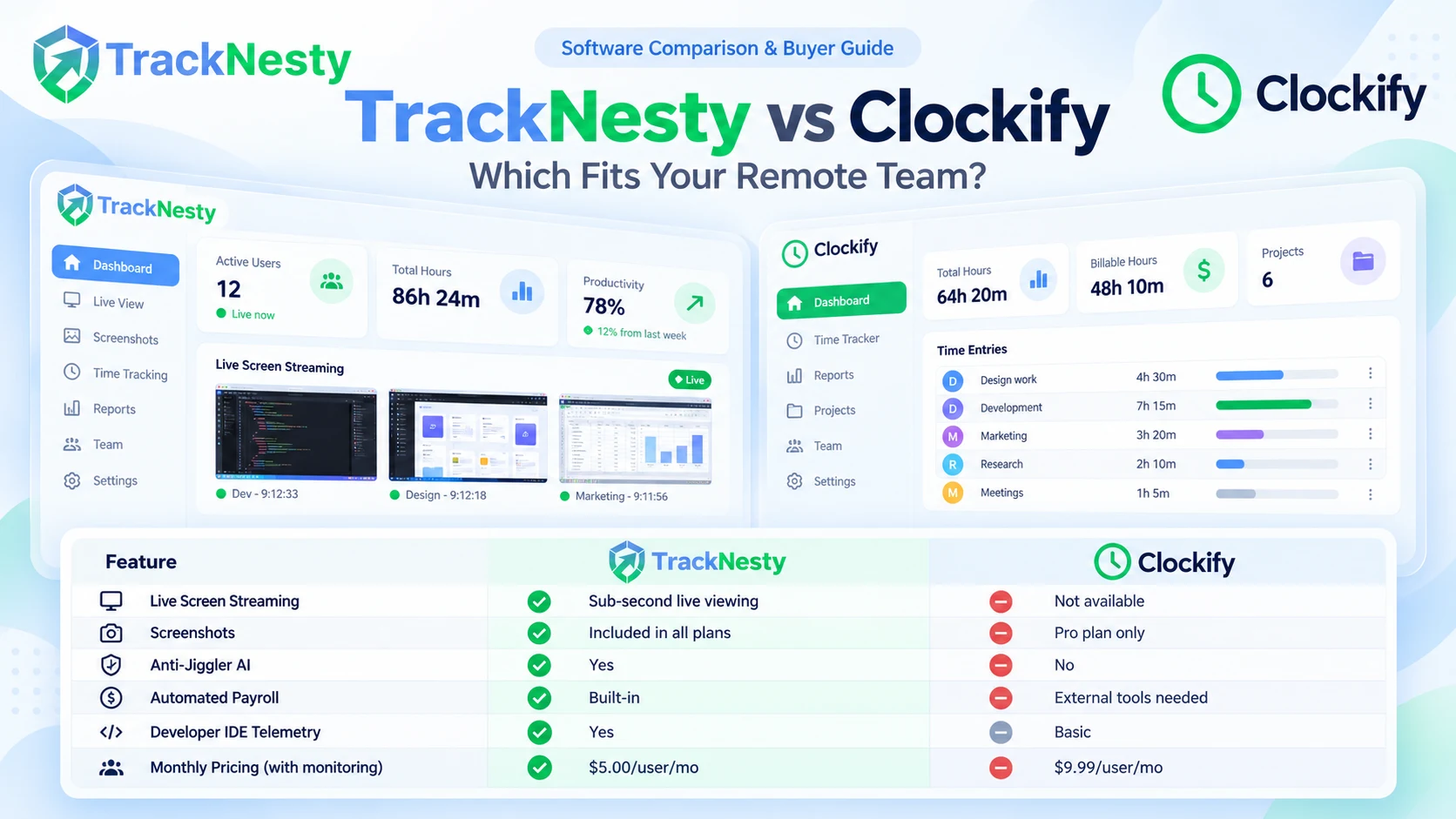
| Live Screen Streaming (WebRTC) | ❌ Not Available | ✅ Sub-Second Live Video Streaming |
| Proof-of-Work Screenshots | ⚠️ Locked behind Pro Plan ($9.99/mo) | ✅ Included in All Plans |
| Anti-Mouse Jiggler AI Detection | ❌ No (Tricked by USB Jigglers) | ✅ Behavioral Trajectory & Cadence AI |
| Automated Payroll & Payslips | ❌ Requires External Software | ✅ Built-In 1-Click Payroll & PDF Slips |
| Developer IDE Telemetry | ⚠️ Basic Window Title Only | ✅ VS Code, JetBrains, & Cursor Metrics |
| Client-Side Gaussian Privacy Blur | ⚠️ Basic Obfuscation | ✅ Zero-Knowledge Local Gaussian Masking |
| Cloud Storage for Project Deliverables | ❌ External Integration Only | ✅ Built-In Centralized Cloud Storage |
| Monthly Pricing (With Monitoring) | ❌ $9.99 / user / month (Pro) | ✅ $5.00 / user / month (Flat Rate) |
6. Pricing Breakdown & Total Cost of Ownership (TCO)
When researching clockify vs tracknesty pricing, looking only at entry headlines can be deceptive. Let’s evaluate the true cost for a team of 20 remote employees:
| Plan Tier | Clockify Per Seat Cost | TrackNesty Per Seat Cost | Total Cost for 20 Users |
|---|---|---|---|
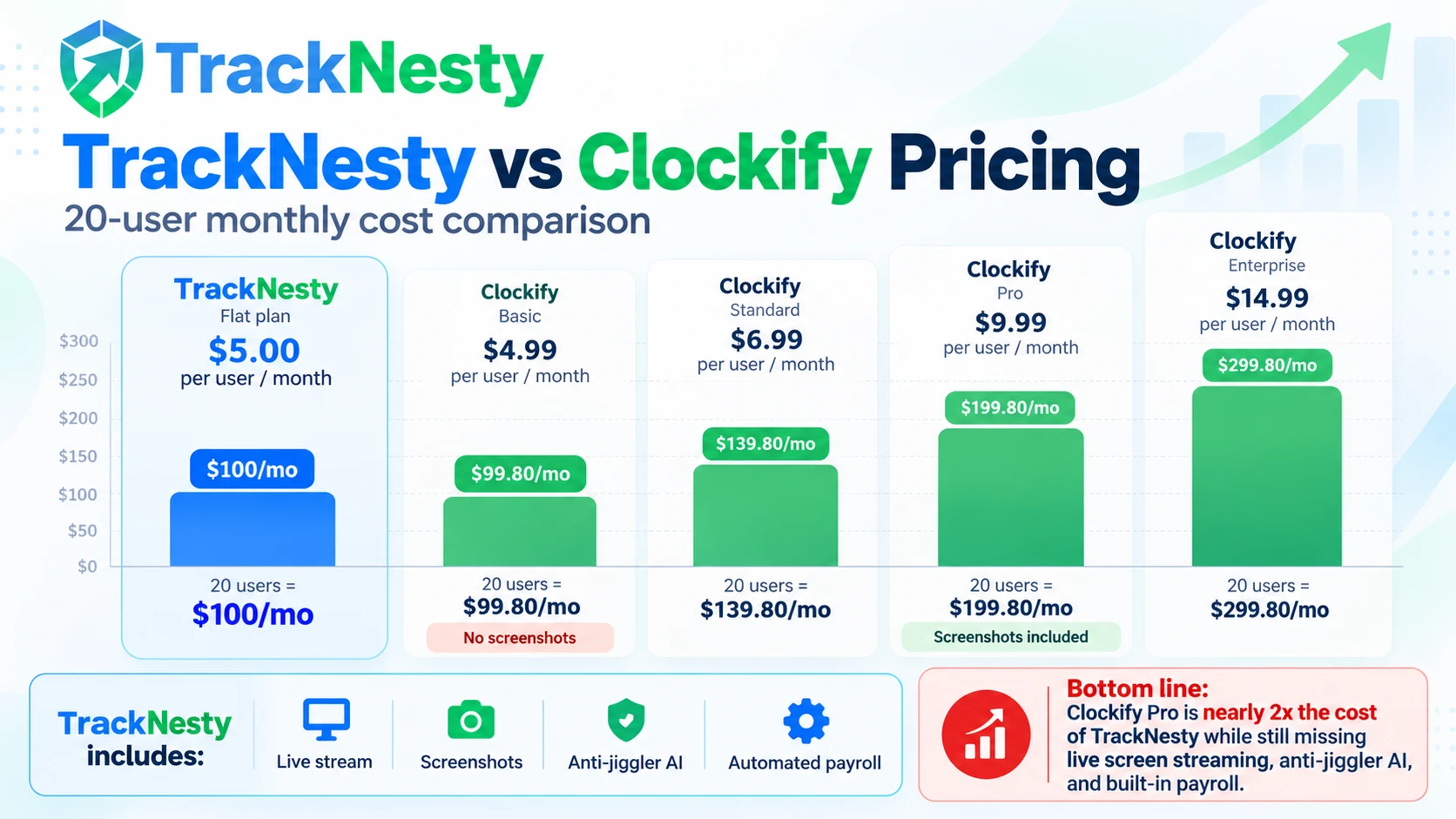
| Basic / Starter Plan | $4.99/mo (No screenshots) | $5.00/mo (30m daily live stream + screenshots) | TrackNesty: $100/mo · Clockify: $99.80/mo |
| Standard Plan | $6.99/mo (Time off + lock timesheets) | $5.00/mo (Included) | TrackNesty: $100/mo · Clockify: $139.80/mo |
| Pro Plan (With Screenshots) | $9.99/mo ($7.99 annual) | $5.00/mo (Included) | TrackNesty: $100/mo · Clockify: $199.80/mo |
| Enterprise Tier | $14.99/mo ($11.99 annual) | Custom High-Volume Discounts | TrackNesty: $100/mo · Clockify: $299.80/mo |
The Bottom Line: For teams requiring screenshot proof of work, Clockify forces an upgrade to the Pro plan ($9.99/user/mo), making Clockify twice as expensive as TrackNesty ($5/user/mo) while still missing live screen streaming, AI anti-jiggler detection, and built-in payroll.
7. Pros & Cons Breakdown
TrackNesty Strengths & Limitations
- Strengths: Live WebRTC screen streaming, AI anti-jiggler protection, built-in automated payroll with PDF payslips, developer-specific IDE tracking, and transparent $5/user/mo pricing.
- Limitations: Desktop tracking client currently optimized for 64-bit Windows 10/11 (macOS client actively under development).
Clockify Strengths & Limitations
- Strengths: Free basic stopwatch for solo freelancers, cross-platform support (Mac, Linux, mobile), and extensive third-party CRM integrations.
- Limitations: No live screen streaming, screenshots locked behind expensive $9.99/mo tier, vulnerable to hardware mouse jigglers, and requires third-party tools for payroll disbursement.
8. Buying Decision: Which Platform Fits Your Team?
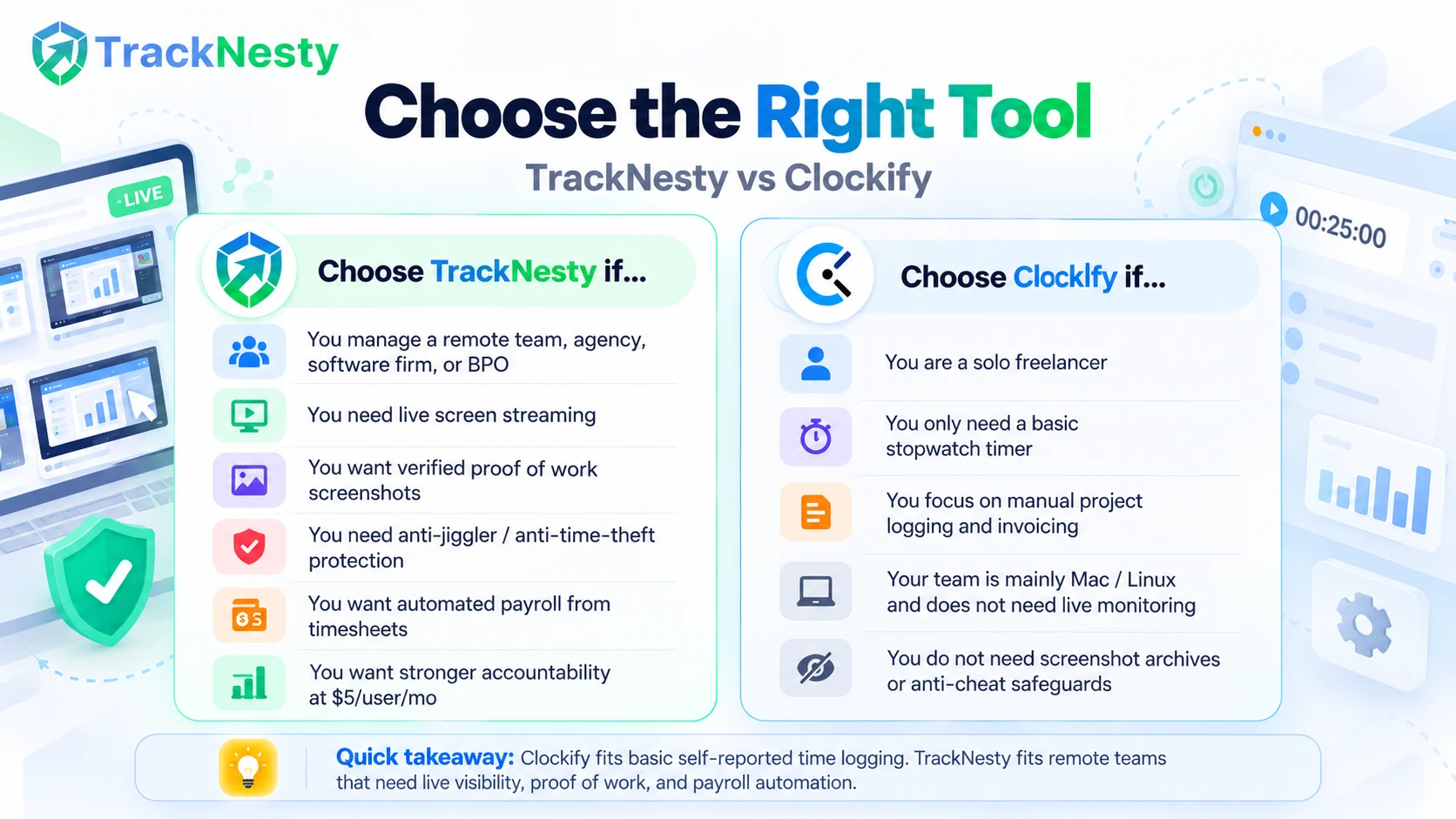
- You manage a remote agency, software firm, or BPO team and need verified proof of work.
- You need instant live screen streaming to observe remote agent workflows in real time.
- You want to eliminate time theft caused by hardware mouse jigglers and auto-clickers.
- You want to automate employee payroll calculations directly from tracked timesheets without manual CSV handling.
- You want full accountability at half the cost of Clockify Pro.
- You are a solo freelancer who only needs a basic free stopwatch timer to bill clients.
- Your entire workforce operates exclusively on macOS/Linux and does not require live desktop monitoring.
- You do not need proof-of-work screenshot archives or anti-cheat safeguards.
9. Frequently Asked Questions
What is the main difference between TrackNesty and Clockify?
Clockify is primarily a traditional manual time-tracking and project logging tool with basic screenshot capabilities on expensive tiers. TrackNesty is an all-in-one workforce intelligence and remote operations platform offering on-demand live desktop screen streaming, AI anti-jiggler detection, automated periodic screenshot archives, and direct automated payroll processing without requiring third-party add-ons.
Does Clockify offer live screen monitoring like TrackNesty?
No. Clockify only supports basic periodic static screenshot capture at predetermined intervals on its higher-tier plans. TrackNesty offers zero-latency, on-demand WebRTC live desktop screen streaming allowing managers to view active agent screens in real-time, toggle multi-monitor setups, and verify active work instantly.
How does TrackNesty vs Clockify pricing compare?
TrackNesty provides straightforward, all-inclusive pricing starting at $5.00 per user/month, which includes time tracking, live streaming, periodic screenshots, and payroll calculation. Clockify advertises a limited free tier, but essential business features like screenshots, labor cost calculation, and manager approvals require upgrading to their Pro ($7.99/user/mo billed annually or $9.99/user/mo monthly) or Enterprise ($11.99/user/mo) tiers.
Can Clockify detect hardware mouse jigglers or automated clickers?
Clockify measures generic keyboard and mouse activity percentages but cannot distinguish between authentic human work and physical USB mouse jigglers or software auto-clickers. TrackNesty includes an advanced Anti-Bypass engine with behavioral cadence analysis that flags unnatural cursor trajectories and simulated activity.
Can I calculate and disburse employee payroll directly in TrackNesty and Clockify?
TrackNesty has a built-in automated payroll calculation engine with compensation rate histories, overtime adjustments, and tamper-evident audit logs. Clockify tracks billable hours and labor rates but requires exporting CSVs or integrating third-party accounting software to finalize payroll runs.
Which software is best for BPOs, agencies, and remote teams?
TrackNesty is engineered specifically for remote agencies, software teams, and BPO operations where verified proof of work, real-time supervisory oversight, and anti-fraud protections are critical. Clockify is best suited for freelancers and consulting agencies who just need basic project billing and manual time logging.
10. Conclusion & Next Steps
When choosing between tracknesty and clockify, the deciding factor comes down to the level of accountability and workflow automation your remote business demands.
While Clockify remains an established option for basic self-reported stopwatch logging, TrackNesty represents the next evolution of remote operations—uniting live screen streaming, tamper-evident timesheets, anti-jiggler AI, and direct payroll automation under a single, transparent plan.
Experience the difference for yourself: Start your free 7-day trial of TrackNesty today with no credit card required.