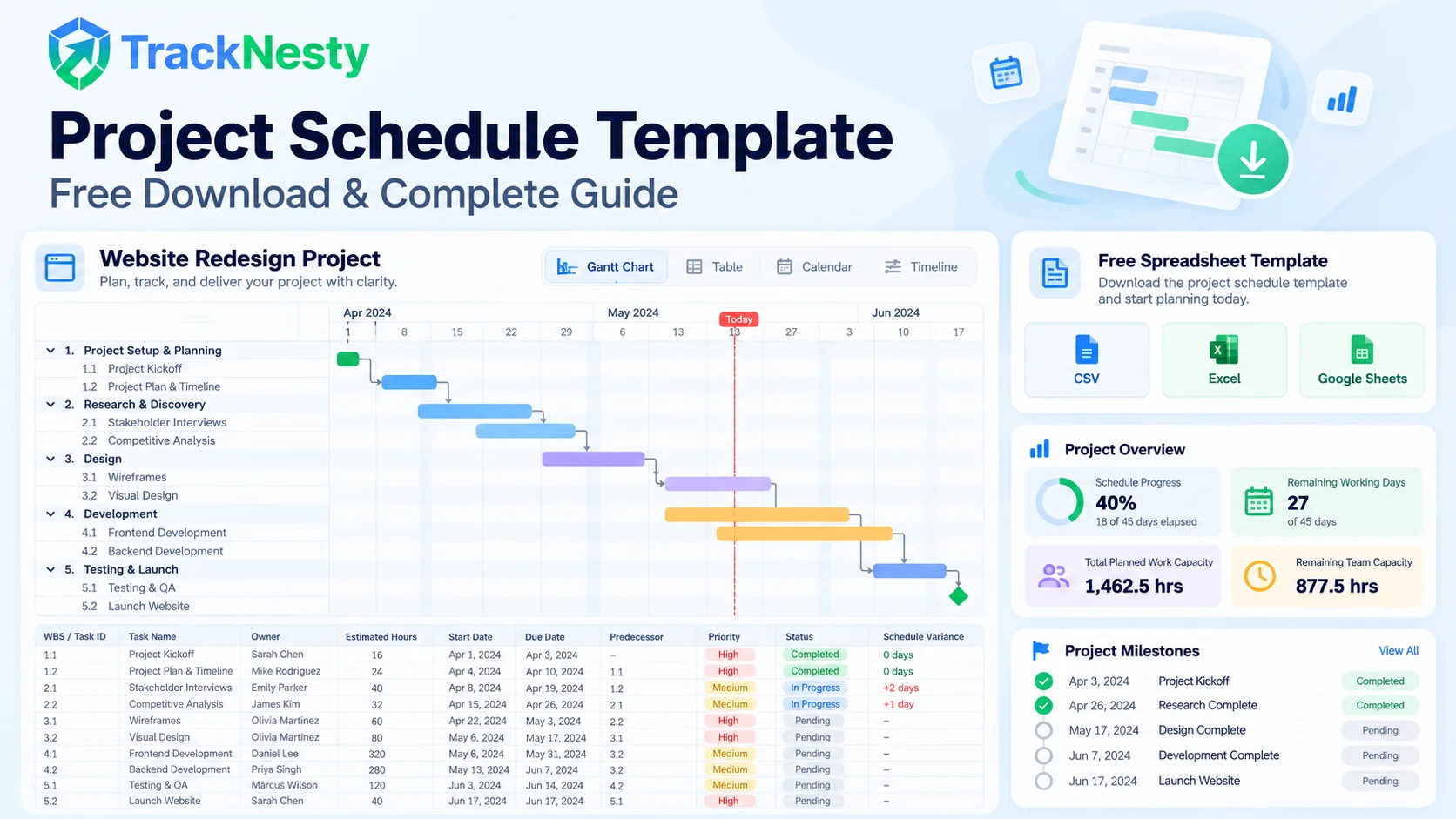
Delivering projects on time and within budget is the cornerstone of profitable operations. When a client signs a contract or leadership approves a product roadmap, stakeholders expect milestones to hit their target dates without surprise delays.
However, without a rigorous project schedule template, projects quietly drift into crisis. It happens incrementally: a design review is delayed by two days, a technical dependency gets blocked by another team, or daily meeting interruptions eat away at developer focus. Before long, over 48% of projects miss their initial target date—not from a lack of engineering talent, but because milestones were planned in isolation without accounting for actual task dependencies and true team capacity.
In this guide, you will learn the exact operational anatomy of an effective project schedule, how to map task dependencies and the critical path, how to calculate schedule variance in real time, and how to avoid the hidden traps of manual spreadsheets. You can also test our interactive timeline simulator below and download a free, ready-to-use CSV template for Excel and Google Sheets.
1. What Is a Project Schedule Template?
A project schedule template is a structured operational blueprint that outlines the chronological execution of a project from initiation to final delivery. While a strategic project plan defines why a project exists, its scope, and overarching risk governance, the project schedule answers the tactical execution questions:
- Who is the single directly responsible individual (DRI) for each task?
- What predecessor tasks must finish before the current step can begin?
- When does each deliverable start, and what is its hard delivery deadline?
- How much productive team capacity will each phase consume?
Whether configured as a spreadsheet or connected directly to project time tracking software, an effective schedule acts as your team's single source of truth, converting complex deliverables into sequential, manageable work packages.
2. Project Plan vs. Project Schedule: Key Differences
Many agency founders, department heads, and managers confuse the terms project plan and project schedule. Understanding how they differ prevents scope misunderstandings with leadership and clients:
| Dimension | Project Plan | Project Schedule |
|---|---|---|
| Core Objective | Defines strategic objectives, business case, overall budget cap, and risk governance. | Specifies the tactical calendar dates, work sequence, and assignee tasks day-to-day. |
| Primary Audience | Executive sponsors, client leadership, investors, and steering committees. | Project managers, team leads, engineers, designers, and daily contributors. |
| Core Content | Scope statement, risk management plan, communication matrix, and change-order rules. | Task IDs, WBS stages, Gantt dependencies, start/due dates, and duration hours. |
| Update Frequency | Reviewed at major phase-gate transitions or formal contract renegotiations. | Updated daily or weekly as tasks progress, hours are logged, and blockers shift. |
| Tracking Mechanism | Milestone status reports and steering committee memos. | Daily standups, automated timesheets, and employee time tracking software. |
A project schedule estimates how long deliverables should take. Pairing schedule baselines with continuous time recording reveals your true Schedule Performance Index (SPI). Read our complete guide on project cost tracking software to monitor financial margins alongside timeline pacing.
3. The 8 Essential Columns of an Effective Project Schedule
A simple to-do list cannot maintain schedule integrity on high-stakes client or software projects. Your schedule template must capture these 8 foundational columns:
- Work Breakdown Structure (WBS) & Task ID: Grouping tasks under clear stages (e.g., Phase 1: Discovery, Phase 2: UI/UX) provides structure. Unique IDs (such as
TSK-101) make dependencies clear across sprint discussions. - Deliverable Name: Specific, outcome-oriented descriptions. Instead of "Design," use "Complete High-Fidelity Figma Prototypes for Mobile Checkout."
- Single Responsible Owner (DRI): Shared accountability leads to missed deadlines. Every task must have exactly one named owner.
- Estimated Work Hours: The estimated focused labor hours required to finish the deliverable—distinct from calendar elapsed days.
- Calendar Start and Due Dates: The defined execution window for the assignee.
- Predecessors & Dependencies: Identifies which prior tasks must reach 100% completion before the current item can begin (Finish-to-Start dependency).
- Status & Priority: Clear state tracking (Not Started, In Progress, Under Review, Completed) paired with urgency tags (Critical, High, Medium).
- Schedule Variance (Days): Compares actual or forecast end dates against the approved baseline to flag schedule slip immediately.
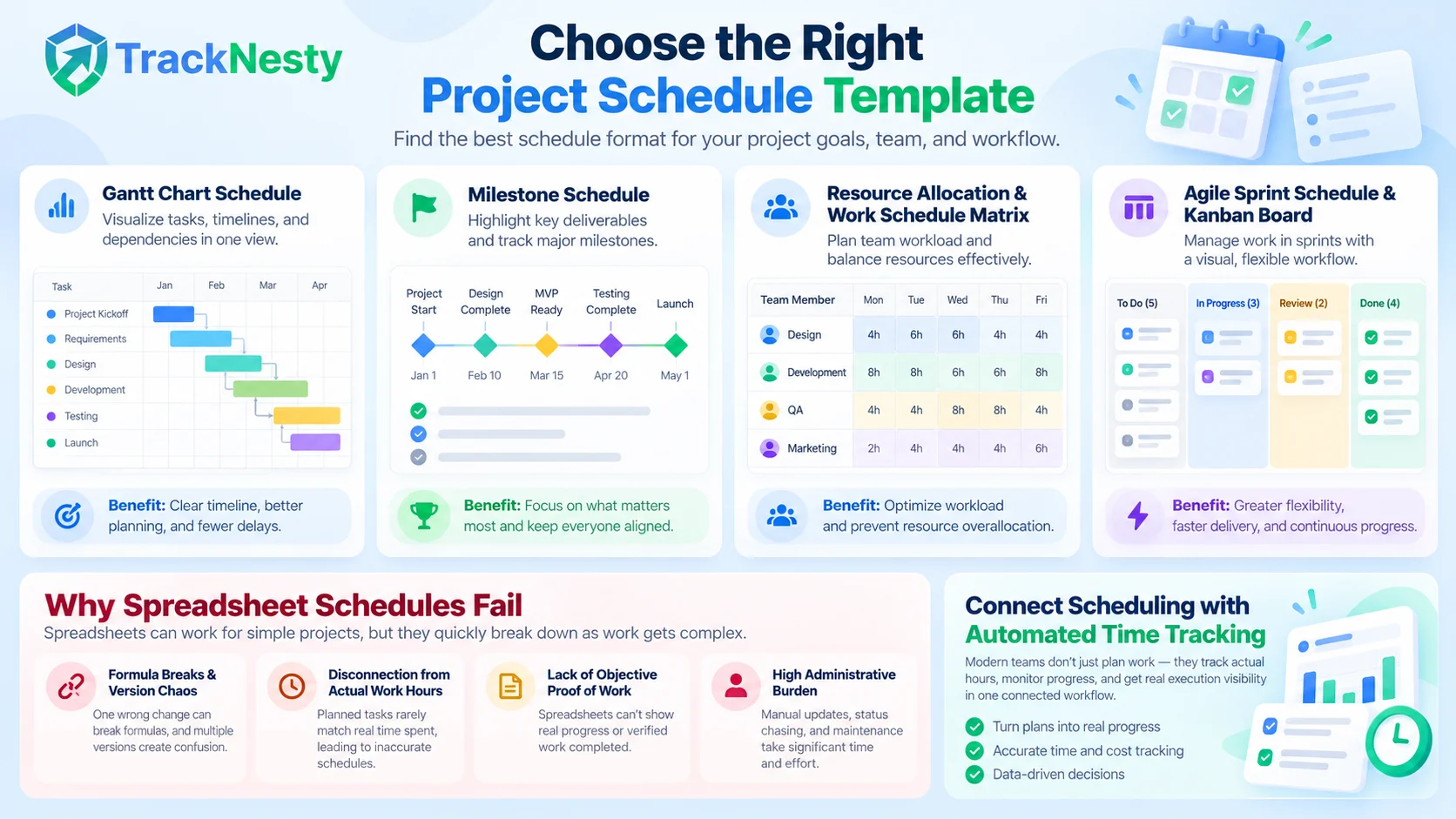
4. 4 Types of Project Schedules (And When to Use Each)
Depending on your organizational structure and client requirements, different schedule views offer distinct operational advantages:
1. Gantt Chart Schedule
The horizontal bar chart remains the industry standard for timeline visibility. Each bar displays task duration on a calendar grid, with connecting arrows showing critical paths and downstream dependencies. Ideal for multi-month campaigns and client-facing roadmaps.
2. Milestone Schedule (Executive View)
A high-level summary that tracks only major inflection points (such as "Scope Signoff," "Beta Release," or "Compliance Approval"). It omits daily micro-tasks, giving executive stakeholders a clear, high-level picture of delivery health.
3. Resource Allocation & Work Schedule Matrix
Focuses on human capacity rather than linear deliverables. It maps team members against weekdays, showing total scheduled hours to prevent over-allocation and burnout. For agencies juggling multiple retainer agreements alongside fixed-scope projects, see our guide on how to track agency retainer hours.
4. Agile Sprint Schedule & Kanban Board
Organizes work into time-boxed iterations (typically 1 to 3 weeks). Tasks progress across visual swimlanes based on their current state rather than rigid calendar dates. To structure team focus during agile iterations, read our complete guide to time blocking.
5. Step-by-Step: How to Build a Project Schedule from Scratch
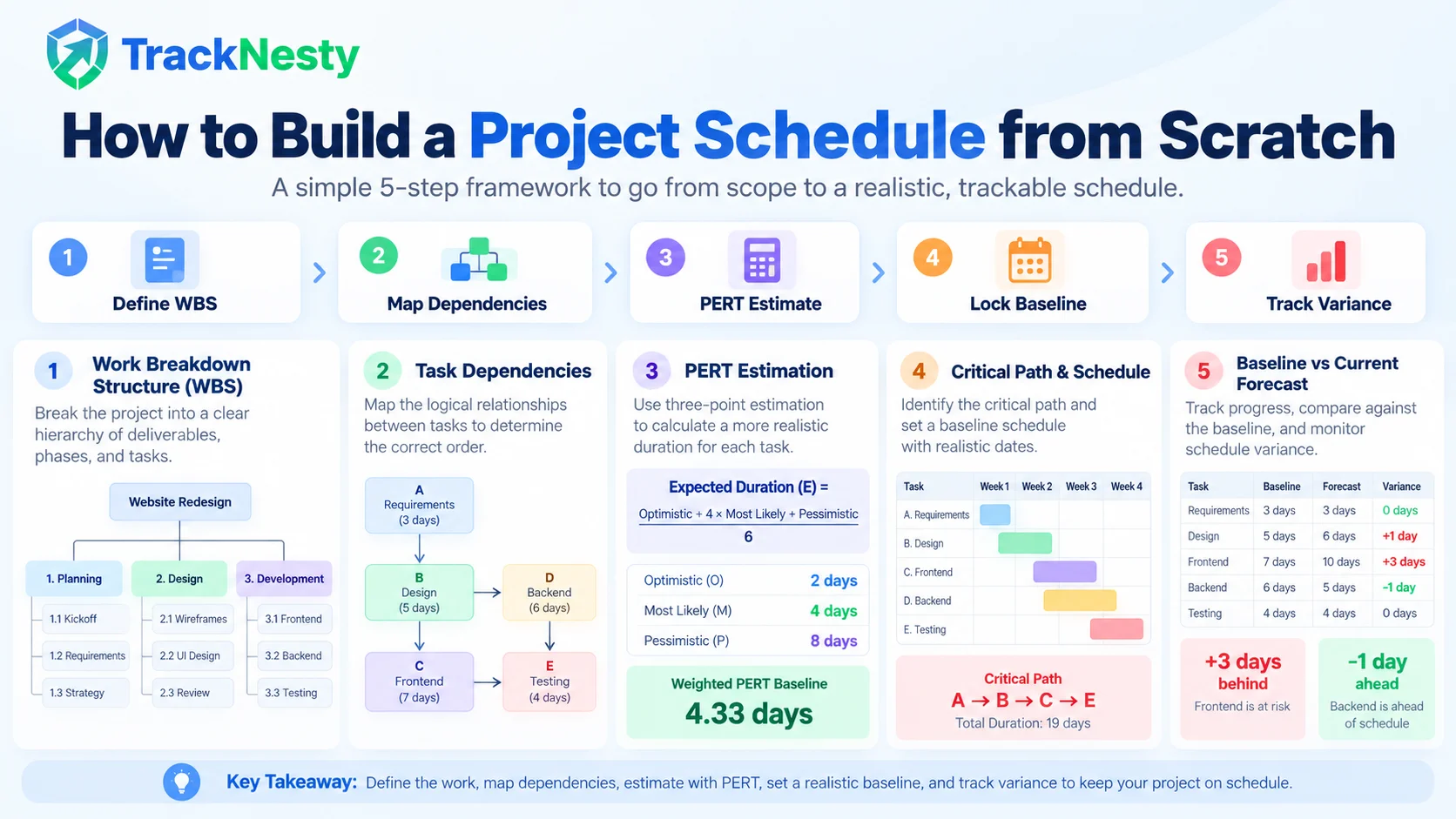
Follow this 5-step operational framework to build a project schedule that holds up under real-world pressure:
Step 1: Define Your Work Breakdown Structure (The 100% Rule)
Decompose your project charter into discrete deliverable chunks before assigning dates. The 100% Rule states that your WBS must capture 100% of the project scope—including client review cycles, QA regression passes, and deployment handovers.
Step 2: Map Dependencies and Calculate the Critical Path
Link dependent tasks. The longest sequence of dependent activities from kickoff to completion is your Critical Path. Any delay to a critical path task delays the entire project completion date by the exact same amount. Highlight these items in your template.
Three-Point PERT Duration Estimation Formula
Human estimation naturally skews optimistic. Use the weighted PERT formula to calculate realistic task durations:
Calculation: (2 + 4(4) + 8) / 6 = 26 / 6 = 4.33 days. Accounting for worst-case risk prevents early schedule compression.
Step 3: Cap Daily Productive Capacity at 5.5 to 6.5 Hours
Scheduling team members for 8 hours of uninterrupted deep work per day guarantees schedule slippage. Internal standups, code reviews, client emails, and context switching consume 20% to 30% of each day. Always build schedules assuming an effective capacity of 5.5 to 6.5 focused hours per person per day.
Step 4: Lock the Baseline and Track Weekly Schedule Variance
Once stakeholders sign off on the schedule, save the dates as your Baseline Schedule. When delays occur, never erase the original baseline dates; update the "Current Forecast" column to monitor variance:
- Variance = Current Forecast Date - Baseline Approved Date
- A positive variance (+3 days) flags that a phase is running behind schedule.
- A negative variance (-1 day) indicates ahead-of-schedule performance.
6. Why Spreadsheet Schedules Fail (And How to Fix Them)
Spreadsheets are widely accessible, but as your project count and team size grow, manual spreadsheets introduce four significant operational risks:
- Formula Breaks & Version Chaos: When team members duplicate tabs or overwrite date cells, predecessor logic silently breaks.
- Disconnection from Actual Work Hours: A spreadsheet cannot verify whether a task took 5 hours or 25 hours—it relies entirely on manual memory.
- Lack of Objective Proof of Work: Clients and managers cannot easily confirm whether delayed milestones are due to technical obstacles or idle context switching.
- High Administrative Burden: Project managers spend hours every week chasing down status updates rather than resolving blockers.
Modern teams solve this disconnect by pairing their schedule milestones with automated employee website and application monitoring. When actual logged time synchronizes automatically with task boards, your schedule reflects real execution rather than optimistic guesses.
7. Project Schedule Configurations by Industry
Different operational models require tailored schedule columns:
| Industry / Model | Key Custom Columns | Primary Schedule Risk |
|---|---|---|
| Creative & Marketing Agencies | Client Review Rounds, Retainer Hours Cap, Asset Approval Date. | Uncontrolled client revision requests pushing back final launch dates. |
| Software & SaaS Engineering | Sprint Epic, Story Points, Pull Request Reviewer, Staging Gate. | Unforeseen technical debt, third-party API delays, and regression bugs. |
| Professional Services & Consulting | Billable Consultant, Milestone Fee, Client Audit Window. | Client delays in providing essential access credentials and financial data. |
| Operations & Construction | Trade Subcontractor, Permit Approval, Site Inspection Date. | Permit bottlenecks, supply chain delivery delays, and weather interruptions. |
If your team operates remotely or bills hourly, explore our analysis on what time tracking software is to see how automated tracking protects margins and client trust.
8. Free Project Schedule Template & Capacity Simulator
To help you organize your milestones immediately, we built a free, working spreadsheet template. It includes standardized columns for Task ID, WBS Phase, Task Name, Assigned Owner, Estimated Hours, Start Date, Due Date, Duration, Predecessors, Priority, Status, and Schedule Variance.
Test our interactive timeline estimator below, and download the clean CSV template for Microsoft Excel, Google Sheets, or Notion with zero email sign-up required:
Free Project Schedule Template & Timeline Estimator
Download the professional CSV template (compatible with Excel & Google Sheets) or simulate timeline pacing below.
Frequently Asked Questions About Project Schedule Templates
What is a project schedule template?
A project schedule template is a pre-formatted framework (in Excel, CSV, Google Sheets, or project management software) that maps out deliverables, work breakdown structures (WBS), assigned team members, start and finish dates, task dependencies, and milestones across a project lifecycle.
How is a project schedule different from a project plan?
A project plan is a comprehensive governance document outlining scope, objectives, stakeholders, risk management, and budget. A project schedule is the tactical timeline subset of the plan that specifies who does what, in what order, and exactly when each deliverable starts and concludes.
What are the essential columns in a project schedule spreadsheet?
Essential columns include Task ID, Work Breakdown Structure (WBS) Phase, Task Name/Deliverable, Assigned Owner, Estimated Work Hours, Start Date, Due Date, Duration in Days, Predecessors/Dependencies, Priority, and Task Status.
Can I import this free CSV template into Google Sheets and Microsoft Excel?
Yes. The downloadable CSV template is 100% standard comma-separated text. You can open it directly in Microsoft Excel, Apple Numbers, LibreOffice Calc, or import it into Google Sheets by selecting File > Import.
When should a team graduate from a spreadsheet schedule to automated time tracking software?
Teams should graduate when spreadsheets become static and disconnected from daily execution—such as when multiple employees juggle overlapping deadlines, actual logged hours deviate wildly from estimates, or project managers spend hours every week chasing status updates rather than reviewing real-time automated dashboards like Tracknesty.
Spreadsheets are an accessible foundation, but as your project roster grows, manual updates consume valuable hours. Tracknesty project time tracking software automatically records active work hours per task, connects timesheets to milestone budgets, flags schedule slips in real time, and exports audit-ready reports in 1 click.